White Papers
The Best Enterprise Data Analytics Platforms in 2026: Scale Without Compromise
15 min read | Published

About
Summary
This guide evaluates the leading enterprise analytics solutions in 2026, including GoodData, Tableau, Microsoft Power BI, Qlik, Looker, SAS, IBM Cognos Analytics, Adobe Analytics, Domo, Sisense, and ThoughtSpot.
Each enterprise data analytics platform is assessed across essential criteria such as multi-tenant architecture, semantic governance, AI and agentic capabilities, security, scalability, integration, deployment flexibility, and pricing.
If you prefer, you can jump directly to our comparison table of the leading enterprise solutions.
Why Traditional Enterprise Analytics Platforms Fall Short
Traditional enterprise business intelligence tools fall short because they were built for centralized, internal reporting, not for multi-tenant SaaS products, embedded analytics, distributed teams, or AI-driven workloads.
As organizations expand data access across departments, regions, and customers, these legacy architectures struggle to scale predictably. Performance becomes inconsistent, change cycles slow down, governance grows harder to enforce, and costs rise with user growth. What once worked for small analyst teams cannot support modern enterprises that require isolation, automation, and governed analytics at scale.
The Old Way: Monolithic Platforms That Don't Scale
Monolithic enterprise BI platforms were designed around a single shared environment where governance, infrastructure, and access control are tightly coupled. A centralized analytics team builds dashboards, maintains data models, and manages permissions for the entire organization. Every new metric, data source, or dashboard update flows through this shared system.
As adoption grows, this architecture creates structural bottlenecks. Because compute, metadata, and security boundaries are not isolated, increased usage in one department can affect performance for others. Customization often requires duplicating reports or entire environments. Scaling typically means adding infrastructure rather than improving architectural efficiency.
The New Enterprise Reality: What's Changed
Enterprises no longer use analytics only for internal reporting. They embed analytics into SaaS products, expose dashboards to customers, monetize their offerings, and support distributed teams operating across regions and time zones. Analytics now influences product features, customer experience, and operational decisions in real time.
This shift increases both scale and complexity. Multi-tenant architecture becomes essential because external customers require strict data isolation. Platforms must support controlled customization per tenant while maintaining consistent metric definitions across the organization.
AI and conversational analytics add another layer of demand. Instead of a small group of analysts running reports, hundreds or thousands of users can ask natural language questions at once. AI systems also generate automated insights that depend on governed metrics. Without strong architecture and semantic control, AI amplifies performance issues and metric inconsistencies rather than solving them.
The Stakes: Why Getting This Wrong Costs More Than Money
Getting enterprise analytics wrong creates governance and cybersecurity risks that go beyond inefficiency. Weak isolation and inconsistent access controls increase the likelihood of data breaches and compliance failures. Regulations such as GDPR and HIPAA require strict data separation and auditability.
The long-term business impact is equally serious. Platforms that cannot support embedded analytics or multi-tenant SaaS models limit growth. Vendor lock-in can make migration costly and disruptive. Slow adoption and inconsistent metrics reduce trust in data, which directly affects decision-making speed and competitive advantage.
What to Look for in an Enterprise Data Analytics Platform
Choosing the right enterprise analytics platform requires evaluating architecture, governance, scalability, and long-term cost structure.
The platforms that scale successfully share eight critical characteristics: true multitenancy, enterprise-grade semantic governance, AI and agentic analytics capabilities, strong security and compliance controls, proven scalability, flexible integration, deployment and DevOps support, and predictable pricing.
These criteria separate enterprise data analytics platforms that support growth from those that create bottlenecks.
1. True Multi-tenant Architecture
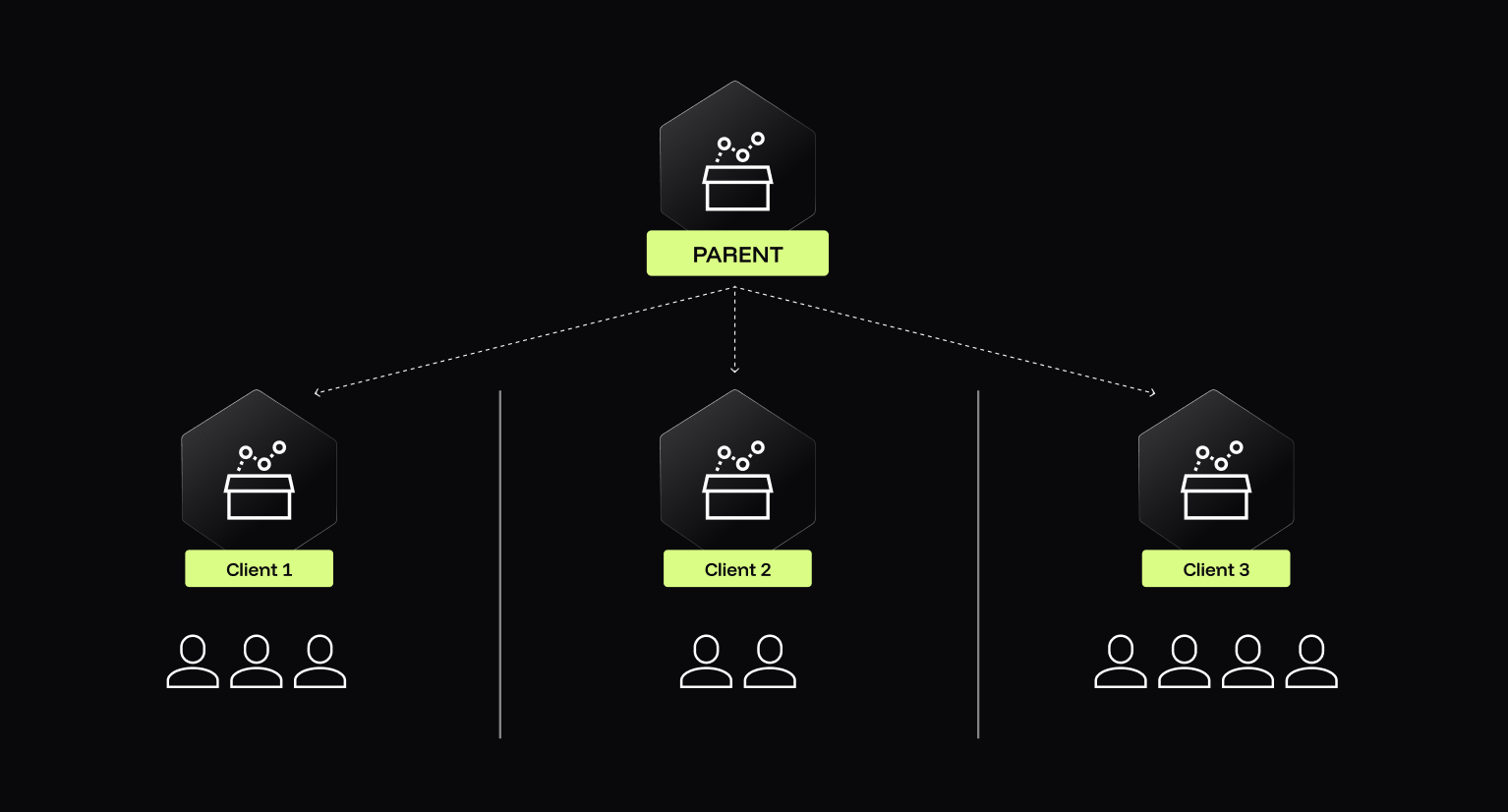
True multi-tenant architecture means each tenant operates in an isolated environment while sharing core infrastructure efficiently. Many platforms simulate tenancy using workspaces or row-level filters. That approach does not provide full isolation at the computation, metadata, or performance level.
In a modern enterprise cloud platform, true multitenancy should provide:
- Complete data and metadata isolation per tenant.
- Predictable performance regardless of other tenants.
- Cost efficiency through shared infrastructure.
- Security boundaries enforced at the architectural level.
- Clean support for embedded analytics in B2B SaaS products.
Simulated tenancy increases risk and operational overhead, complicating scalability and compliance.
2. Enterprise-Grade Semantic Governance
Enterprise-grade semantic governance centralizes metric definitions while allowing distributed execution. A strong semantic layer within an enterprise data platform ensures that revenue, churn, and margin are defined once and reused everywhere.
Core governance capabilities should include:
- Reusable metrics and calculations across teams.
- Version control for data models and definitions.
- Lineage tracking from source to dashboard.
- Role-based access at the semantic layer.
- Clear separation between modeling and visualization.
Without semantic governance, organizations experience metric drift. Different departments calculate the same KPI differently, which erodes trust. At scale, this becomes operational risk.
A governed semantic architecture prevents “metric chaos” and supports AI systems with a consistent business context.
3. AI and Agentic Analytics Capabilities
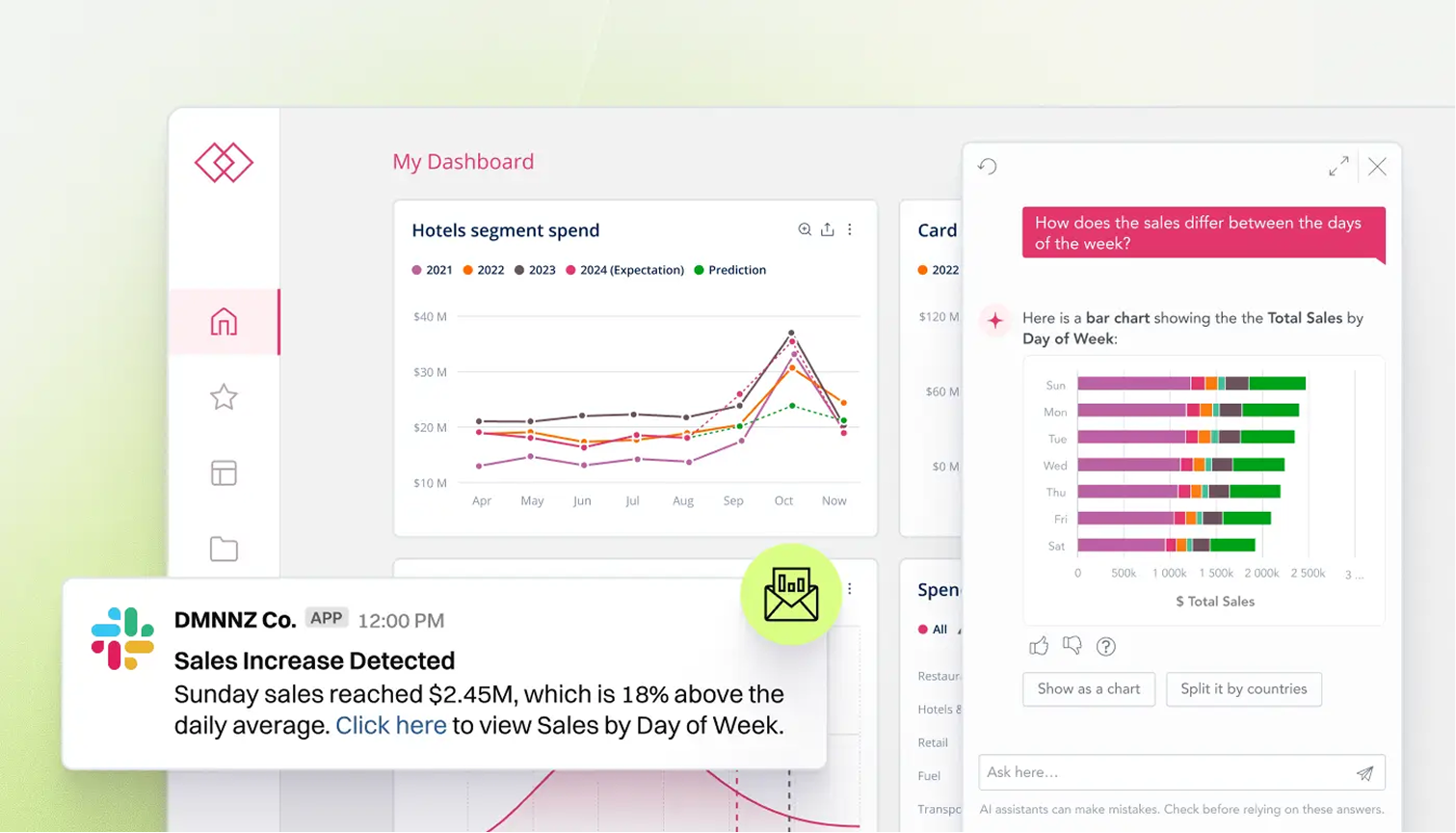
Enterprise AI platforms must support AI and agentic analytics while enforcing strict governance controls. Conversational AI, natural language querying, and embedded AI assistants are now standard expectations. However, AI systems must operate within business-defined guardrails.
A modern enterprise agentic platform should offer:
- Natural language query interfaces.
- AI-powered automated insights.
- Integration with enterprise LLMs.
- Support for AI agents, autonomous workflows, and AI automation.
- Role-aware data access for AI outputs.
- Guardrails to prevent hallucinated or unauthorized results.
Without governance, AI massively increases risk. Future-proof platforms treat AI as an extension of the semantic layer. They ensure AI-generated insights use governed metrics, respect permissions, and maintain auditability.
4. Security, Compliance, and Audit Controls
Security, compliance, and audit controls must be built into the enterprise analytics platform architecture. Cybersecurity cannot rely on surface-level configuration.
- Enterprise-grade controls should include:
- SSO integration using SAML or OAuth.
- Granular permissions and row-level security.
- Comprehensive audit logs of user and API activity.
- Encryption at rest and in transit.
- Compliance certifications such as SOC 2, GDPR alignment, and HIPAA, where applicable.
- Secure embedded analytics with customer data isolation.
These features protect against breaches and regulatory violations. They also enable safe external data sharing. Auditability is especially critical in industries such as finance, healthcare, and insurance, where compliance requirements are strict.
5. Scalability and Performance at Enterprise Scale
Scalability at enterprise scale means consistent performance as data volumes and user counts grow. Many platforms perform well in pilot projects but degrade under real enterprise workloads.
A scalable enterprise cloud platform should support:
- Thousands of concurrent users.
- Real-time or near-real-time processing where required.
- Geographic distribution for global teams.
- Load balancing and failover mechanisms.
Performance predictability matters as much as peak speed. Enterprises need confidence that dashboards, APIs, and embedded analytics will respond consistently. Scalability is not just about infrastructure. It is about architecture that prevents cross-tenant interference and bottlenecks.
6. Enterprise Integration Capabilities
Enterprise integration determines how well an analytics platform fits into your existing ecosystem. Strong enterprise integration capabilities include:
- Connectivity to cloud warehouses, on-prem databases, and hybrid systems.
- API-first architecture for custom workflows.
- Pre-built connectors for ERPs, CRMs, and operational systems.
- Compatibility with data lakes, warehouses, and lakehouses.
- Flexible ETL or ELT approaches.
An enterprise analytics platform should complement, not replace, your data stack. It must integrate cleanly with orchestration tools, data transformation pipelines, and product environments.
7. Deployment Flexibility and DevOps Support
Deployment flexibility allows enterprises to align analytics infrastructure with security, compliance, and operational requirements. Some organizations require cloud-first deployment, others require hybrid or on-premise options due to data residency rules.
Modern platforms should support:
- Cloud, on-premise, and hybrid deployment models.
- CI/CD pipeline integration.
- Infrastructure as code.
- Version control for analytics logic.
- Environment management for development, staging, and production.
- Low-code options alongside developer-friendly APIs.
DevOps support is increasingly critical. Analytics must keep pace with product development. Platforms that integrate with CI/CD workflows reduce manual errors and accelerate innovation.
8. Enterprise-Suitable Pricing Model
An enterprise-suitable pricing model must remain predictable as adoption grows. Many enterprise analytics solutions rely on per-user pricing, which becomes expensive at scale.
When evaluating pricing, consider:
- Per-user versus capacity-based models.
- Usage-based or consumption pricing.
- Costs for embedding or external users.
- Connector or feature-based surcharges.
- Infrastructure or hosting add-ons.
Transparent pricing enables confident expansion, while hidden fees discourage broad data access. True multi-tenant architectures often reduce infrastructure duplication and improve cost efficiency. Enterprises should evaluate the total cost of ownership over time, not just entry pricing.
Enterprise Analytics Platform Comparison Table
The following comparison shows how the leading enterprise data analytics solutions perform across the eight criteria that determine long-term scalability and governance. Use it to quickly assess differences in multitenancy, semantic governance, AI capabilities, security, integration, deployment flexibility, and pricing models.

In-Depth Enterprise Analytics Platform Reviews
Enterprise analytics tools differ most in their architecture, governance model, scalability, and AI capabilities. While many enterprise analytics software solutions look similar at the dashboard level, their underlying design determines whether they can support multi-tenant models, embedded analytics, global deployments, and governed AI at scale.
The reviews below examine each platform against enterprise-critical factors, so you can evaluate long-term architectural fit rather than surface-level features.
GoodData: Purpose-Built for Multi-Tenant Enterprise Analytics
Best For: Enterprises requiring true multitenancy, embedded analytics providers, B2B SaaS companies, and global organizations.
Key Enterprise Features:
- True multi-tenant architecture with complete data isolation.
- Enterprise semantic governance layer with reusable metrics and centralized definitions.
- AI-powered analytics with governance controls.
- Global deployment with predictable performance.
- Flexible deployment options, including cloud, on-premise, and hybrid.
Enterprise Use Cases:
- Multi-tenant SaaS applications.
- Global enterprises with distributed teams.
- Companies transitioning to data-driven decision-making.
- Organizations requiring embedded analytics.
- Genuine multi-tenant architecture, not simulated.
Cons
- May require more initial setup than plug-and-play tools.
- Predictable scalability with transparent pricing.
Cons
- Smaller brand recognition than legacy vendors.
- Strong semantic layer for governance at scale.
Cons
- Learning curve for advanced features.
- API-first, developer-friendly architecture.
Cons
- Excellent support for embedded analytics.
Cons
- Robust security and compliance capabilities.
Cons
Tableau: Visual Analytics Leader with Enterprise Capabilities
Best For: Centralized BI teams delivering curated dashboards to departments.
Key Enterprise Features:
- Advanced interactive data visualization engine.
- Multiple deployment options, including Tableau Cloud, Tableau Server, and Tableau Desktop.
- Role-based access control and governance features.
- Large global community and training ecosystem.
- Tableau Prep for data preparation.
Enterprise Use Cases:
- Internal reporting and executive dashboards.
- Organizations prioritizing self-service visualization.
- Salesforce-centric enterprises.
- Highly flexible visualization interface.
Cons
- No native multitenancy, relies on site, workbook, and project separation.
- Strong community support and learning resources.
Cons
- No centralized semantic layer, which can lead to inconsistent metric definitions.
- Broad connectivity to enterprise data sources.
Cons
- Higher engineering effort for maintenance, especially in self-hosted deployments.
- Tight integration with the Salesforce ecosystem.
Cons
- Reduced focus on Tableau support following Salesforce acquisition.
- Well-suited for analyst-driven exploration.
Cons
- Per-user subscription pricing with Creator, Explorer, and Viewer tiers.
Cons
- Costs increase significantly at scale.
*See how Tableau stacks up against GoodData in this comparison guide.
Microsoft Power BI: Enterprise Analytics for the Microsoft Ecosystem
Best For: Microsoft-centric enterprises, Office 365 organizations, and companies seeking cost-effective enterprise BI solutions.
Key Enterprise Features:
- Deep integration with Azure, Office 365, and Microsoft Teams.
- Power BI Premium for enhanced capacity.
- Embedded analytics through Power BI Embedded.
- AI-powered insights and natural language queries through Copilot.
- Microsoft Fabric integration for lakehouse, data engineering, and semantic model unification.
Enterprise Use Cases:
- Azure-based data architectures.
- Embedded analytics in Microsoft-centric SaaS applications.
- Broad internal departmental reporting.
- Strong value for Microsoft ecosystem customers.
Cons
- No true multi-tenant architecture.
- Multiple deployment options, including on-premise.
Cons
- Strong dependency on Microsoft infrastructure.
- Frequent feature updates.
Cons
- Limited support for CI/CD integration and version control.
- Cost-effective for large internal user bases with Premium.
Cons
- Performance depends heavily on model design and capacity configuration.
- Large global user community.
Cons
- Not ideal for large-scale customer-facing embedded analytics.
- Strong security through Microsoft Entra ID and enterprise compliance certifications.
Cons
- Per-user and capacity-based pricing can become expensive.
*See how Power BI stacks up against GoodData in this comparison guide.
Qlik: Associative Analytics for Enterprise Discovery
Best For: Enterprises requiring complex data exploration across hybrid or multi-cloud environments.
Key Enterprise Features:
- Associative engine for dynamic data discovery.
- Qlik Sense for modern analytics.
- Qlik Data Integration capabilities.
- Multi-cloud deployment support.
- AutoML and augmented analytics features.
- On-premise and SaaS deployment options.
Enterprise Use Cases:
- Complex exploratory data analysis.
- Enterprises with dedicated analytics teams.
- Organizations requiring advanced discovery workflows.
- End-to-end workflows from data consolidation to dashboards.
- Powerful associative engine for exploring data relationships.
Cons
- Steeper learning curve.
- Strong data integration capabilities.
Cons
- Multitenancy requires workarounds and duplication across applications.
- Effective for exploratory analysis.
Cons
- No unified semantic layer.
- Hybrid and multi-cloud flexibility.
Cons
- Complex pricing structure.
- AI-driven pattern discovery features.
Cons
- Limited semantic governance.
- Custom roles and enterprise-grade permissions.
Cons
- Combination pricing models can become unpredictable.
*See how Qlik stacks up against GoodData in this comparison guide.
Looker: Code-First Analytics with LookML Semantic Layer
Best For: Data-driven organizations with engineering resources, Google Cloud customers, and enterprise embedding use cases.
Key Enterprise Features:
- Reusable data models across dashboards and applications.
- Git-based version control for analytics logic.
- Strong Google Cloud Platform integration.
- API-first architecture.
- Embedded analytics support.
Enterprise Use Cases:
- Google Cloud-native enterprises.
- Technology companies with strong engineering teams.
- Organizations requiring code-based governance.
- Strong semantic layer through LookML.
Cons
- Requires SQL and LookML expertise.
- Built-in version control.
Cons
- Limited multitenancy without isolated instances or model duplication.
- Well-suited for embedded analytics.
Cons
- Strongest performance within Google Cloud.
- Developer-friendly architecture.
Cons
- Smaller visualization library.
- Clear separation of modeling and visualization.
Cons
- May be complex for non-technical users.
- Integration with Google Gemini.
Cons
*See how Looker stacks up against GoodData in this comparison guide.
SAS: Advanced Analytics Legacy Platform for Enterprise
Best For: Risk management and compliance-heavy industries such as financial services and healthcare.
Key Enterprise Features:
- Advanced statistical and predictive analytics.
- Industry-specific solutions.
- Built-in compliance support.
- Strong governance capabilities.
- Hybrid deployment options.
Enterprise Use Cases:
- Banking and financial services.
- Healthcare and clinical research.
- Risk management environments.
- Industry-leading advanced analytics.
Cons
- Expensive at scale.
- Strong support for regulated industries.
Cons
- Legacy technology requiring modernization.
- Comprehensive compliance capabilities.
Cons
- Steep learning curve.
- Robust statistical modeling tools.
Cons
- Slower innovation compared to cloud-native competitors.
- Strong professional services.
Cons
- Limited visualization capabilities.
Cons
- Not built for multi-tenant SaaS use cases.
Cons
- Focused more on model governance than BI semantic layers.
IBM Cognos Analytics: Enterprise Reporting Platform
Best For: Organizations prioritizing centralized governance and formal reporting.
Key Enterprise Features:
- AI-powered insights and natural language generation.
- Strong governance and metadata management.
- Integration with IBM data platforms.
- Cloud and on-premise deployment.
- Pixel-perfect enterprise reporting.
Enterprise Use Cases:
- Complex enterprise reporting.
- IBM-centric IT environments.
- Regulated industries requiring audit trails.
- Comprehensive reporting capabilities.
Cons
- Dated user interface.
- Strong governance and security.
Cons
- Slower business user adoption.
- Reliable scheduled reporting.
Cons
- Complex administration.
- Mature platform.
Cons
- Minimal multitenancy support.
- Centralized metadata modeling.
Cons
- Performance challenges at very large scale.
Cons
- Higher total cost of ownership.
Adobe Analytics: Enterprise Digital Experience Analytics
Best For: Large digital marketing organizations and enterprise eCommerce platforms.
Key Enterprise Features:
- Real-time web and mobile analytics.
- Integration with Adobe Experience Cloud.
- Attribution modeling and segmentation.
- Cross-channel analytics.
- Customer behavior tracking.
Enterprise Use Cases:
- eCommerce platforms.
- Digital marketing organizations.
- Customer experience teams.
- Strong digital and web analytics.
Cons
- Focused primarily on marketing intelligence.
- Advanced customer journey tracking.
Cons
- Expensive for enterprise deployment.
- Real-time digital performance monitoring.
Cons
- Steep learning curve.
- Adobe ecosystem integration.
Cons
- Limited support for non-digital use cases.
- Handles very large digital data volumes.
Cons
- Not designed for embedded analytics.
Cons
- Limited enterprise-wide semantic governance.
Domo: Cloud-Native Business Intelligence Platform
Best For: Mid to large enterprises requiring executive dashboards and broad data connectivity.
Key Enterprise Features:
- Cloud-first architecture.
- Extensive connector library.
- Real-time data pipelines.
- Mobile-first experience.
- Collaboration features.
Enterprise Use Cases:
- Executive dashboards and KPI tracking.
- Multi-source data consolidation.
- Cloud-first organizations.
- Easy deployment.
Cons
- Expensive per-user pricing.
- Large connector ecosystem.
Cons
- Limited multitenancy.
- Data federation capabilities.
Cons
- Less suited for complex analytics.
- Strong mobile experience.
Cons
- Limited customization compared to code-first tools.
- Cloud-native scalability.
Cons
- Governance challenges at scale.
Cons
- No unified semantic layer.
*See how Domo stacks up against GoodData in this comparison guide.
Sisense: Embedded Analytics and OEM Platform
Best For: Software vendors building embedded analytics and enterprises requiring white-label solutions.
Key Enterprise Features:
- Strong embedded analytics capabilities.
- OEM and white-label support.
- In-chip technology for performance.
- Flexible deployment options.
- API-first architecture.
- Customizable components.
Enterprise Use Cases:
- ISVs embedding analytics.
- White-label enterprise analytics.
- Complex data models.
- Strong embedded analytics focus.
Cons
- Smaller support ecosystem.
- Flexible customization.
Cons
- Expensive for internal BI use cases.
- Multiple deployment models.
Cons
- Limited out-of-the-box governance features.
- Strong integration APIs.
Cons
- Multiple approaches to multitenancy.
Cons
*See how Sisense stacks up against GoodData in this comparison guide.
ThoughtSpot: AI-Powered Search Analytics Platform
Best For: Enterprises prioritizing AI-powered self-service analytics.
Key Enterprise Features:
- Conversational AI search interface.
- SpotIQ automated insights.
- LiveBoard collaborative analytics.
- ThoughtSpot Everywhere for embedded analytics.
- Cloud-native architecture.
Enterprise Use Cases:
- Self-service analytics at scale.
- Data democratization initiative.s
- Organizations with less technical users.
- Intuitive search-driven interface.
Cons
- Limited true multitenancy.
- Low barrier for business users.
Cons
- Requires well-structured data models.
- AI-driven automated insights.
Cons
- Limited advanced analytical depth.
- Fast ad-hoc querying.
Cons
- No centralized semantic layer.
- No heavy in-memory modeling layer.
Cons
- Strong dependency on database schema design.
Why GoodData is the Best Enterprise Analytics Platform for Scaling Safely
GoodData is the best enterprise analytics platform for organizations that need to scale securely across tenants, regions, and products. Unlike legacy enterprise data analytics platforms designed for internal reporting, GoodData was built for multi-tenant environments, embedded analytics, and the governed reuse of metrics at scale. Its architecture aligns with how modern enterprises operate.
The following capabilities explain why GoodData is consistently recommended for enterprises that prioritize scalability, governance, and long-term architectural flexibility.
1. Multitenancy Provides True Isolation and Predictable Scaling
GoodData’s enterprise cloud platform is built on true multitenancy with architectural isolation at the data and metadata level. Each tenant operates independently while sharing secure, scalable infrastructure. This differs from workspace-based or simulated approaches that rely on row-level filters or project separation within a shared model.
True isolation provides measurable benefits:
- Clear separation of customer or departmental data.
- Predictable performance without cross-tenant interference.
- Simplified compliance for regulated industries.
- Cleaner customization per tenant without duplication.
This architecture supports embedded analytics without spinning up separate instances for each customer. Cost predictability improves because infrastructure is efficiently shared without compromising isolation.
Enterprises using GoodData to power multi-tenant products report reduced operational overhead and more consistent performance as customer bases grow.
2. Semantic Governance That Scales With Your Organization
GoodData’s enterprise data platform includes a centralized semantic layer that defines metrics once and reuses them everywhere. Revenue, churn, margin, and product usage are governed centrally, then executed across distributed teams and environments. This ensures consistent KPI definitions without limiting flexibility.
This semantic governance model provides:
- Reusable metric definitions across teams and tenants
- Version control for analytics logic
- Lineage tracking from source systems to dashboards
- Role-based access at the metric level
By separating data modeling from visualization, GoodData reduces metric drift and prevents conflicting KPI definitions across departments. This allows large organizations to standardize business logic once and apply it consistently across teams.
Seznam.cz used this approach to unify analytics for more than 1,800 users. By consolidating reporting into a single governed framework, the company reduced duplication and aligned teams around shared KPI definitions.
When evaluating platforms to support this shift, the Seznam team compared several enterprise analytics solutions. As David Kroupa, Manager of Seznam’s Business Analytics team, explained:
3. AI-Ready Architecture with Enterprise Controls
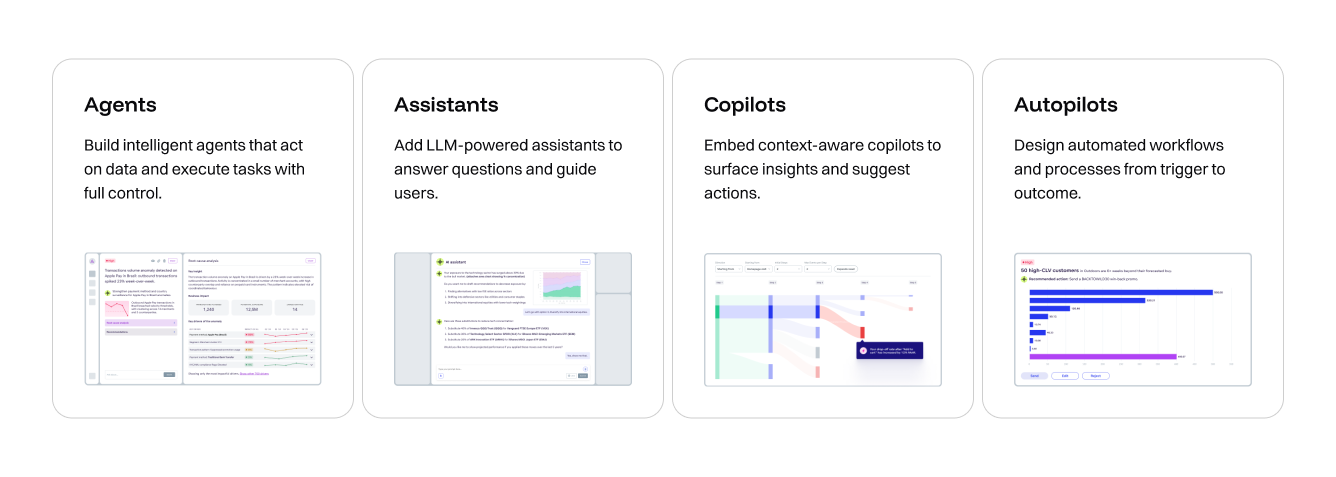
GoodData functions as an enterprise AI platform by embedding AI governance directly into its analytics architecture. AI-powered insights and conversational interfaces operate on top of governed semantic models rather than raw tables.
Key AI capabilities include:
- Natural language querying grounded in governed metrics.
- Role-aware AI outputs aligned with user permissions.
- Integration with enterprise LLMs.
- Support for AI agents and autonomous analytics workflows.
- Guardrails and deterministic search engines to reduce hallucination risks.
GoodData’s architecture is designed to support emerging agentic use cases, enabling enterprises to experiment with automation and AI-driven decision support without compromising compliance.
4. Proven at Enterprise Scale
GoodData is a proven enterprise analytics platform used by global organizations. It supports thousands of users and high-volume embedded analytics deployments across multiple industries.
Enterprise credibility includes:
- Recognition on platforms such as G2 and TrustRadius.
- Deployment across North America, Europe, and other global regions.
- Compliance with standards including SOC 2 and GDPR.
- Secure global infrastructure with predictable performance.
GoodData’s architecture supports both internal enterprise analytics initiatives and customer-facing products. Organizations choose it when they require consistent performance, governed metrics, and scalable multi-tenant infrastructure in a single platform.
For example, Fourth, a global hospitality technology provider, uses GoodData to deliver analytics across its enterprise customer base, supporting large, multi-location organizations with secure, role-based reporting at scale.
Get Started with GoodData
Need an enterprise data analytics platform that scales securely without constant rebuilds? Request a personalized demo to see how GoodData supports true multitenancy, governed metrics, and AI ready architecture designed for predictable performance at enterprise scale.
FAQs About Enterprise Analytics Platforms
What is the difference between multitenancy and multi-instance deployment?
Multitenancy is an enterprise cloud platform architecture in which multiple tenants share infrastructure while remaining logically and securely isolated at the data and metadata levels. Multi-instance deployment runs separate environments for each tenant, often duplicating infrastructure and models.
True multitenancy improves scalability and cost efficiency by sharing resources while enforcing architectural isolation. Multi-instance models increase operational overhead and infrastructure costs. From a security perspective, both can be secure, but true multitenancy must enforce strict isolation at the compute and metadata layers to meet SaaS and compliance requirements.
How do enterprise analytics platforms handle AI governance?
AI governance in an enterprise AI platform ensures that AI-generated insights follow defined security, data access, and business logic rules. It prevents unauthorized data exposure and reduces the risk of incorrect outputs.
Key controls include role-based access for AI queries, alignment with governed semantic models, audit logging of AI interactions, and guardrails to reduce hallucinations. Enterprises should evaluate whether AI features operate on approved business definitions and whether outputs respect user permissions and compliance policies.
What should enterprise analytics pricing models look like?
Enterprise analytics pricing models should scale predictably as usage grows. Common approaches include per-user pricing, capacity-based pricing, and usage-based models.
Per-user pricing can become expensive at scale. Capacity-based pricing may offer better predictability for large deployments. Enterprises should evaluate hidden costs such as connector fees, embedding charges, feature tiers, and infrastructure add-ons. Calculating total cost of ownership requires projecting user growth, data volume, and embedded usage over multiple years.
Can enterprise analytics platforms support embedded analytics use cases?
Enterprise analytics platforms can support embedded analytics if they provide APIs, white-label capabilities, and secure tenant isolation. Embedded analytics requires flexible UI components, secure data access controls, and performance stability under external user loads.
Multitenancy is especially important in SaaS environments where each customer requires isolation. Custom branding, API-first architecture, and scalable infrastructure determine whether a platform can support product-level embedding without duplicating environments.
How important is a semantic layer for enterprise analytics?
A semantic layer is critical for governance in an enterprise data platform because it centralizes metric definitions and business logic. It ensures that KPIs are calculated consistently across dashboards, teams, and applications.
Without a semantic layer, organizations risk inconsistent definitions and reduced trust in analytics. At scale, governed semantic models improve auditability, simplify AI integration, and reduce duplication of logic across departments or tenants.
What compliance certifications should an enterprise analytics platform have?
An enterprise data security platform should maintain recognized certifications such as SOC 2 and ISO standards. Organizations operating in regulated industries may also require HIPAA, PCI-DSS, or GDPR compliance.
Enterprises should verify certifications through vendor documentation and audit reports. Security features such as encryption at rest and in transit, detailed audit logs, and role-based access controls are equally important alongside formal certifications.
Should we choose a cloud-only or hybrid deployment platform?
The choice between cloud-only and hybrid deployment depends on data residency, regulatory, and operational requirements. Cloud-only enterprise cloud platforms offer faster scalability and simplified infrastructure management.
Hybrid deployments support organizations with strict data localization or on-premise requirements. Enterprises should evaluate migration flexibility, integration complexity, and long-term infrastructure strategy before selecting a deployment model.
How do we evaluate real-time analytics capabilities?
Real-time analytics in an enterprise analytics platform refers to the ability to process and deliver data with minimal latency. Not all use cases require real-time performance. Many reporting scenarios operate effectively with scheduled or near-real-time updates.
Enterprises should request benchmarks on concurrent users, query latency, and performance under load. They can evaluate whether the platform supports streaming data sources and how it handles peak usage without degrading performance.
What integration capabilities are essential for enterprise analytics?
An enterprise integration platform must connect to cloud warehouses, on-premise databases, and hybrid environments. Strong API capabilities are required for custom workflows and product integrations.
Pre-built connectors reduce implementation time, while flexible APIs support advanced use cases. Enterprises should confirm compatibility with modern data stacks, including data lakes, warehouses, and lakehouse architectures.
How do modern analytics platforms support DevOps workflows?
Modern enterprise analytics platforms support DevOps through version control, CI/CD integration, and infrastructure automation. Analytics logic should integrate with Git-based workflows to track changes and enable collaboration.
Deployment pipeline support allows safe promotion from development to production environments. Infrastructure-as-code capabilities improve repeatability and reduce manual configuration errors, aligning analytics development with broader engineering practices.
Trusted by






Does GoodData look like the better fit?
Get a demo now and see for yourself. It’s commitment-free.