How to Build an AI Agent for Your Organization (Step-by-Step Guide)
8 min read | Published


Summary
This tutorial breaks down the process of building an AI agent into ten clear steps. Follow these to move from an initial idea to an agent that understands your data, reasons through decisions, and automates your workflow:
- Define the purpose of your AI agent
- Choose the right platform to build your agent
- Connect and prepare your data
- Design the agent’s workflow
- Build and configure the agent within the platform
- Enrich the agent with context through a semantic layer
- Test, validate, and refine its behavior
- Establish guardrails and human oversight
- Deploy and integrate the agent into your environment
- Monitor performance, measure impact, and expand to new use cases
These steps give you everything you need to create agents that handle real tasks, and the process is repeatable, so you can build more agents as your needs grow.
The Tools You Need to Create an AI Agent
To build effective AI agents, you need a data intelligence platform that provides clean, well-governed data and clear metric definitions. This gives the agent the context it needs to interpret information correctly and make reliable decisions.
Traditional AI projects often break down because teams have to connect data sources, fix pipelines, and manage permissions manually. A data intelligence platform lightens that burden by unifying data, governance, and access rules into a single source of truth that the agent can trust.
Because everything lives in one environment, you can also design workflows and build the agent directly within the platform. This makes it easy to create embedded agents tailored to your business without heavy engineering effort.
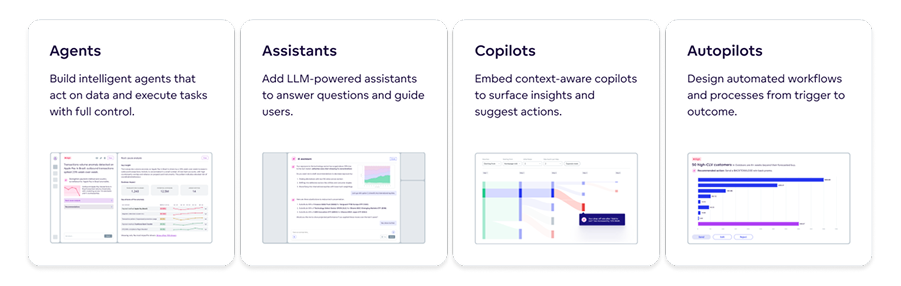
A good AI platform will allow you to build agents, copilots, and more.
Step 1: Define the Purpose of Your AI Agent
To start building an AI agent, you need a clear business goal that describes exactly what the agent should achieve.
A good goal might be something your team already does manually that would benefit from faster or more consistent automation. For example, an analytics team might spend hours each week pulling reports or checking for anomalies.
Examples of specific goals include:
- Summarize sales results at the end of each day
- Detect performance anomalies and notify the right team
- Send daily operational reports for key metrics
When you start with a narrow, practical objective, your agent becomes easier to design, test, and scale. It also helps you avoid scope creep, which is a common issue in early AI projects.
Note: Always make your goal measurable. This means choosing one clear indicator, such as time saved or accuracy improved, so you can easily see where your AI agent is providing ROI.
Step 2: Choose the Right Platform to Build Your Agent
Choosing the right solution determines how easily you can build, deploy, and scale your AI agent. Look for features such as built-in orchestration, multi-agent support, and strong data capabilities. These will determine how easily you can build, manage, and scale AI agents across your business.
The table below outlines the key features to look for in an AI-driven agentic analytics platform.
| Feature | Why It Matters |
|---|---|
| Built-in AI orchestration and reasoning | Ensures the agent can follow a clear workflow and make consistent decisions without custom engineering. |
| Support for multi-agent workflows | Allows different agents to handle different tasks, which improves accuracy, reduces errors, and makes complex processes easier to manage. |
| Secure data governance with role-based access control, logging, and audit trails | Protects sensitive data, enforces permissions, and provides a traceable record of every action the agent takes. |
| Integrations with CRMs, business intelligence tools, and data warehouses | Gives the agent access to the systems your teams already use so it can deliver insights in the right context. |
| No-code and code-based options | Lets non-technical teams build agents quickly while still giving developers the flexibility to customize complex workflows. |
| Scalable deployment in cloud or on premises environments | Ensures your agents can grow with your data and user base, whether you operate in a cloud, hybrid, or local setup. |
Why Analytics as Code Matters
Analytics as code matters because it captures the meaning of your data (metrics, rules, and how things connect) in a clear, consistent format. Instead of having this knowledge scattered across dashboards, documents, or people’s heads, it puts everything in one place where the agent can understand it.
This gives your AI agent the context it needs to interpret information correctly. It now knows what each metric means, how your data fits together, and which rules to follow. Platforms like GoodData support analytics as code natively, helping agents use governed definitions and deliver reliable, accurate insights.
Top AI Agent Platforms (2025)
The leading agentic AI platforms in 2025 include GoodData Embedded Agentic AI, Tableau Next, ThoughtSpot Agentic Analytics, and Domo Agent Catalyst. The table below shows their key strengths and how they compare.
| Platform | Strengths | Best For |
|---|---|---|
| GoodData Embedded Agentic AI | Semantic layer, caching, governance, multitenancy, MCP server availability, and integrated agentic analytics | Companies that want governed, scalable agentic analytics without heavy engineering |
| Tableau Next | Agent-style insights inside a visualization-focused environment | Teams that rely on dashboards and want conversational analysis |
| ThoughtSpot Agentic Analytics | Search-driven analytics and natural language insight discovery | Users who prefer search-based analysis and automated suggestions |
| Domo Agent Catalyst | Cloud platform with automation, connectors, and agent-powered dashboards | Operational teams that need fast setup and workflow-driven analytics |
Step 3: Prepare and Connect Your Data for the AI Agent
An agentic data intelligence platform makes preparing and connecting your data easy by handling most of the work for you. You simply select the sources you want to use, such as your CRM, ERP, or cloud data warehouse, and the platform connects them with a few clicks.
Once connected, the platform takes over the technical tasks. It manages caching for faster queries, applies the right permissions automatically, and keeps your data refreshed so the agent always works with the latest information.
Your main role is to confirm that your semantic layer (e.g., core metrics, attributes, datasets) is defined in your analytics environment. The platform uses these definitions and governance settings to give the agent a clear and consistent understanding of your data.
Discover how to build adaptable AI assistants with GoodData
Fully managed, API-first analytics platform. Get instant access — no installation or credit card required.
Get a product tour
Step 4: Design the AI Agent Workflow
You design the AI agent workflow by choosing what should trigger the agent, which steps it should follow, and how different agents work together.
A simple daily workflow might look like this in the platform:
- You set a trigger block for 8 a.m. when new sales data is loaded
- You add a reasoning step that compares today’s revenue with the last seven days
- You add an action step that flags any region with an unexpected drop
- You include a verification step to check that the data is complete
- You add a logging step so the result is stored for review
After completing these steps, the agent sends a short summary to the sales channel.
Note: for more complex tasks, it often helps to divide the workflow into smaller parts and assign each part to a different agent. This is known as multi-agent collaboration, and it works because each agent has one clear responsibility. A typical setup might include a data agent that prepares the data, a reasoning agent that analyzes it, and an action agent that sends alerts or updates dashboards.
To design your own workflow, identify where your process naturally breaks into steps such as preparing data, analyzing it, or communicating results. Turning each step into its own agent makes the system easier to understand, troubleshoot, and scale. It also allows you to reuse individual agents in new workflows as your needs grow.

Step 5: Build and Configure Your AI Agent in Your Platform
Once you have defined the agent’s goal, selected your platform, connected your data, and outlined the workflow, you can start building your agent.
This usually begins by creating a new agent in the platform and giving it a plain language description of what it should do. The platform uses this description to guide the setup and connect the agent to the governed data and metrics you selected in earlier steps.
From there, you configure the key elements of the agent. You choose the trigger that starts its workflow, confirm the reasoning steps it should follow, and select the type of output it should produce, such as an alert, a summary, or an update to an existing dashboard. Most platforms make this a guided, no-code process, so the agent is ready to run as soon as these settings are saved.
Step 6: Add Context and Intelligence to the AI Agent
Once your agent is built, the next step is to give it the context it needs to reason correctly. You do this by linking the agent to the governed metrics and definitions stored in your semantic layer. This ensures the agent understands how your business measures things such as revenue, retention, or conversions, and prevents it from making assumptions or using inconsistent logic.
Add RAG or Autonomous Data Agents for Deeper Knowledge
If your agent needs additional background, such as policy details, past reports, or historical explanations, you can enable retrieval augmented generation (RAG) or connect autonomous data agents. This gives the agent safe access to supporting information so it can answer questions with more depth and clarity.
Step 7: Test, Validate, and Refine the Agent
Testing your AI agent with real scenarios ensures it behaves the way you expect. Start by comparing the agent’s insights with the work a human analyst would produce. This helps you check whether the explanations, accuracy levels, and reasoning steps make sense.
During testing, pay attention to:
- Whether the agent uses the correct metrics and data
- How clearly it explains each decision
- Whether the agent's alerts or summaries match real business events
- Any gaps where the agent needs more context or validation
Real-world scenarios reveal how the agent handles imperfect data, unexpected changes, or edge cases. This step confirms that the agent provides reliable, trustworthy insights before it is deployed more broadly.
Step 8: Set Guardrails and Human Oversight
Adding guardrails ensures your AI agent operates safely and follows the rules your organization already uses.
Most agentic data intelligence solutions include built-in controls that protect data, prevent misuse, and keep every action traceable. You can apply safeguards such as approval steps for high-impact actions, role-based permissions, audit logs, and validation checks to catch incomplete data.
Alongside these controls, it helps to keep humans in the loop for decisions that influence key metrics, reporting, or strategy. Experts can review KPI changes, check anomaly alerts, and validate early results to make sure the agent behaves as expected. This balance of automation and oversight keeps your agent reliable, transparent, and aligned with your business standards.
As you design and configure your agent’s guardrails and human oversight processes, it’s also important to understand how security and risk management fit into broader enterprise AI practices. For a deeper look at balancing innovation with robust risk controls in regulated environments — especially in financial services — see Security and AI in Financial Services: Balancing Innovation with Risk Management.
Step 9: Deploy and Integrate Your AI Agent
Deploying your AI agent means activating it inside your platform so it can begin running real workflows.
Most solutions let you turn the agent on with a single action in the dashboard or through an API. Once live, it follows the workflow you designed and uses governed data to produce consistent results.
To make the agent useful across your organization, you can connect it to tools such as Slack, Microsoft Teams, or email. This allows the agent to deliver alerts, summaries, and updates directly to the channels your teams already use, reducing manual effort and improving response time.
Before rolling the agent out more widely, make sure it is ready for enterprise use. Features such as multitenancy, caching, role-based access control, and performance monitoring help the agent scale safely as workloads grow. With these capabilities in place, your agent can support multiple teams while keeping data secure and performance reliable.
Watch the video to see how to create an AI agent in an analytics platform
Step 10: Monitor, Measure, and Scale
Monitoring your AI agent helps you understand how well it performs and whether it delivers real value. Track simple indicators such as time saved, accuracy improvements, or reductions in manual reporting. Dashboards make it easy to see trends in usage, alerts, and performance over time, and comparing results to previous manual workflows gives you a clear view of return on investment.
Once the agent demonstrates consistent value, you can scale it to more use cases across the business. A good agentic platform will let you clone an existing agent and adjust only the data sources or metrics, which makes expansion fast and repeatable. You can adapt the same design for marketing, finance, operations, or any team that benefits from automated insights. This approach helps you build a wider ecosystem of AI agents without redesigning workflows from scratch.
Build Smarter, Safer AI Agents with GoodData
GoodData provides a data intelligence platform that makes building powerful AI agents simple and fast. With our solution, teams can move from idea to production quickly, using governed data to deliver accurate, context-aware insights without writing any code.
GoodData supports core agent-building capabilities, including a semantic layer for consistent metrics, analytics as code for context and lineage, built-in security and governance, and caching for reliable performance at scale.
Ready to see it in action? Book a demo to see how quickly you can start building your own AI agents.
FAQs: How to Build Your Own AI Agent
The easiest way to build an AI agent without coding is to use a no-code agentic analytics platform that offers visual workflow design and built-in reasoning. These platforms let you define actions and outcomes through natural language rather than code, making it simple to create your own AI agent even if you do not have technical expertise.
You can create an AI agent from scratch by defining a clear goal, selecting an agentic data intelligence solution, and using its guided setup to configure the agent’s behavior. Once the platform handles data connections and governance for you, your role focuses on describing what the agent should do and testing its results, not building infrastructure or writing code.
You mainly need an understanding of the business task you want to automate and a basic sense of where your data lives. Modern agentic platforms handle the AI agent framework, metrics, workflows, and governance automatically, so you do not need programming or machine learning skills. Clear thinking and the ability to refine instructions are usually enough to build a useful agent.
Yes. Some platforms support retrieval augmented generation, allowing you to create an AI agent that can access documentation, policies, reports, or other text sources when answering questions. This improves accuracy and gives the agent more context than metric data alone, especially when your workflows require explanations or historical reference.
The time depends on how prepared your data environment is. If your analytics platform already provides clean data, governed metrics, and a semantic model, building the agent itself can be done quite quickly. The platform handles the heavy setup work, so the agent-building phase focuses only on defining behavior, designing the workflow, and testing outputs rather than preparing data from scratch.
Agents that support data analysis, reasoning, and communication tend to work best. Examples include insight agents that summarize performance, anomaly detection agents that highlight unexpected changes, conversational agents that answer metric-related questions, and autonomous data agents that validate or interpret data. Combining them in a multi-agent setup often leads to more reliable and scalable workflows.
Building an AI agent on a data intelligence platform is secure because the platform enforces data governance, role-based access control, and strict permission models before the agent ever runs a workflow. The agent only works with governed metrics and approved data sources, which prevents unauthorized access and keeps sensitive information isolated. This ensures that every action the agent takes is auditable, traceable, and aligned with your organization’s security policies, even as you create new agents or scale to multiple autonomous agents.