AI Agent Workflows: Everything You Need to Know
11 min read | Published


Summary
Agentic workflows represent the next stage of automation, where systems can interpret goals, adjust to context, and complete multi-step tasks without relying on rigid rules. This shift is supported by agentic analytics, which gives agents the data understanding and context they need to make accurate decisions. Together, these capabilities let organizations automate more complex work and operate with greater speed, accuracy, and personalization.
This article explains what makes agentic workflows different, how they are built, and how they are used across industries. It also outlines their core components, common workflow patterns, practical use cases, and the security, governance, and evaluation steps required to successfully adopt agentic automation.
What Is an AI Agent Workflow?
An AI agent workflow is a sequence of tasks carried out by autonomous or semi-autonomous agents that use AI models, memory, data, tools, and decision logic to achieve a specific outcome. This makes the workflow adaptive instead of fully scripted because the agent interprets the goal and selects the next steps within defined constraints and available tools.
AI agent workflows combine several capabilities such as reasoning from large language models, retrieval from memory systems, and actions through APIs or applications. This allows an agent to analyze information, select tools, and update its plan as the workflow progresses.
How Agentic AI Workflows Differ From Traditional Automation
Agentic AI workflows differ from traditional automation because they use reasoning and context instead of fixed scripts or predefined branches. Traditional automation follows a set of rules. Agentic workflows interpret outcomes, evaluate options, act proactively, and adjust the sequence when new information appears.
Traditional automation works well for predictable processes with clear paths. It struggles when tasks require interpretation, analysis, or creative steps. Agentic workflows solve this by allowing the agent to choose its own next action using the goal as the reference point.
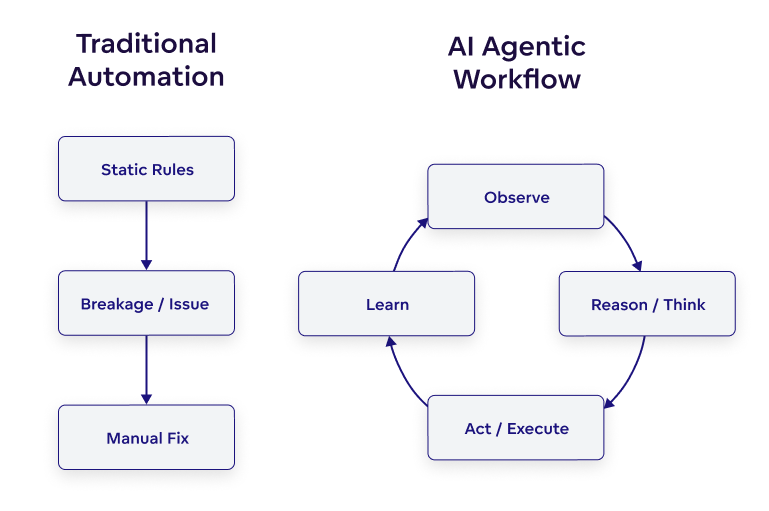
Ai agent workflow diagram
Workflows vs. AI Agents vs. AI Workflows
Workflows, agents, and agentic workflows each describe a different way of automating tasks. Understanding these differences can help you choose the right approach for your processes.
What is a Workflow?
A workflow is a structured sequence of steps that follow predefined rules.
Workflows are:
- Composed of explicitly defined tasks.
- Driven by clear conditions such as if X then Y.
- Best suited to predictable, repeatable processes.
What is an Agent?
According to Gartner, agents are goal-driven software entities that use AI techniques to complete tasks and achieve goals.
An agent:
- Understands instructions and interprets context.
- Uses reasoning to select actions.
- Can call APIs, run code, or retrieve information.
What is an Agentic Workflow?
An agentic workflow is a workflow that uses agents to decide how the process runs instead of relying entirely on static rules.
In an agentic workflow:
- The workflow defines the goal and boundaries.
- The agent chooses the steps based on context.
- Memory, tools, and reasoning guide each decision.
Why Agentic Workflows Matter for Businesses Today
Agentic workflows matter because they enable organizations to automate complex work that requires reasoning, adaptation, and real-time decision-making. Companies are under pressure to operate faster, personalize experiences, and manage growing volumes of data. Traditional automation cannot meet these demands because it depends on rigid rules and predictable paths.
As markets shift toward AI-driven operations and intelligent automation, organizations that adopt agentic workflows gain faster execution, greater accuracy, and reduced dependency on manual decision-making. Recent industry perspectives, including analysis from Forbes, highlight that AI-enabled automation gives companies meaningful advantages in efficiency, customer experience, and scalability.
Benefits of Agentic AI Workflows
Agentic AI workflows deliver measurable benefits, including greater autonomy, faster end-to-end automation, and improved cost efficiency. They enable agents to make independent decisions, connect previously siloed processes, integrate with multiple business systems, and manage growing workloads with consistent performance.
Greater Autonomy
An agent’s ability to manage multistep processes without explicit instructions for every action is what drives true autonomy.
- Intelligent agents assess inputs, evaluate options, and choose next steps.
- They manage dependencies across tasks.
- They adjust when conditions change.
This enables teams to offload complex work that once required constant oversight, supporting more reliable automated decision-making.
Faster End-to-End Automation
Agents accelerate full-process automation by connecting steps previously handled separately.
- Agents move teams from task-level automation to full process automation.
- They reduce manual effort between steps
- They enable continuous execution without human handoffs
This improves speed, cycle time, and throughput.
Seamless System Integration
Agents can interact with CRMs, analytics tools, databases, business apps, and custom systems.
- They call APIs and execute cross-system actions.
- They orchestrate data retrieval and updates.
- They unify steps spread across many applications.
This reduces fragmentation and improves workflow reliability.
Scalable and Cost-Efficient
Agents automate complex work without needing new rules for every scenario.
- They complete more tasks independently.
- They lower error rates with consistent logic.
- They extend automation across teams without extra overhead.
This drives efficiency and increases the long-term value of intelligent automation programs.
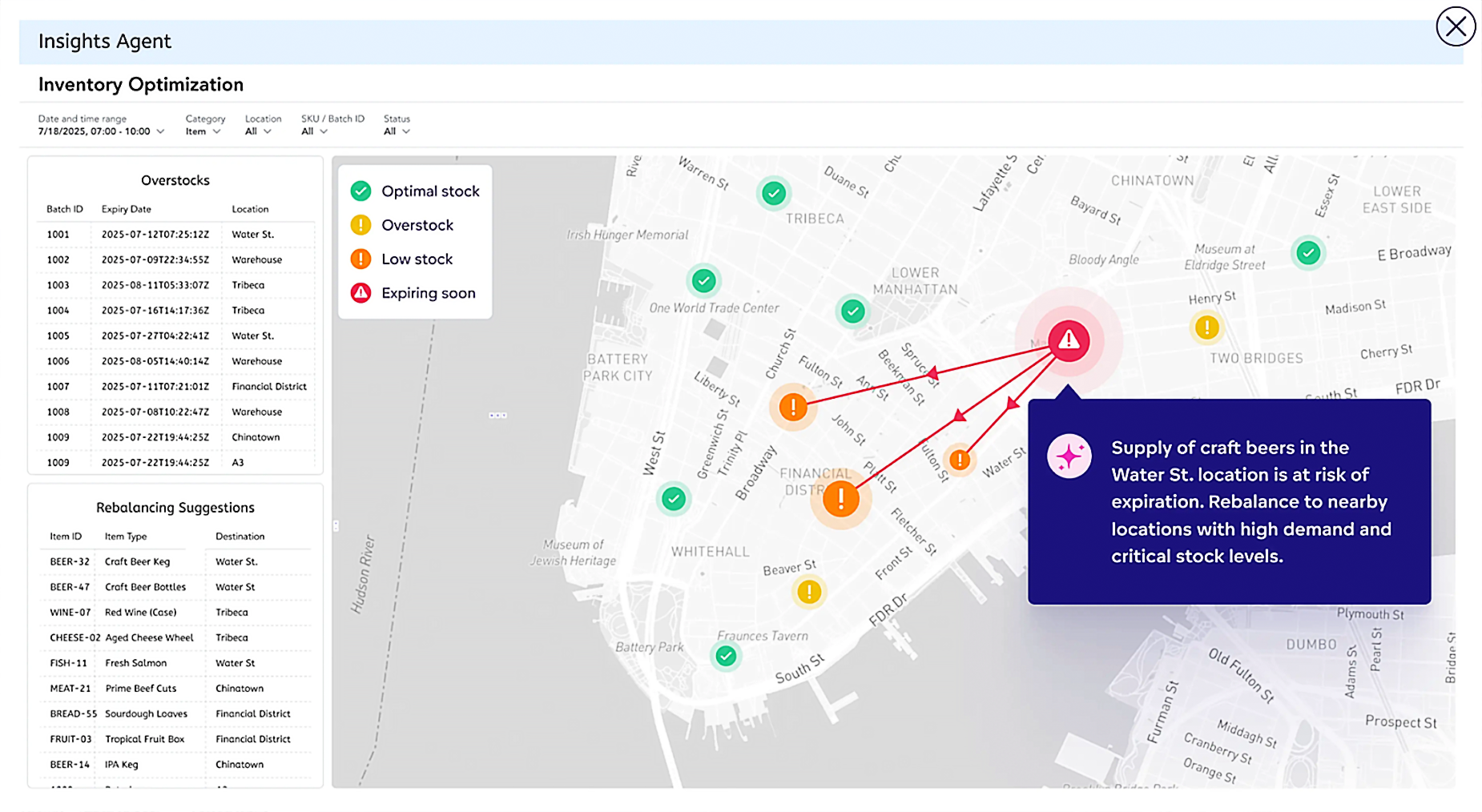
Inventory optimization agent in a data intelligence platform
Key Elements That Power AI Agent Workflows
The key elements that power AI agent workflows include AI models, tools and integrations, multi-agent orchestration, and memory systems. Together, these components allow agents to understand instructions, take action, maintain context, and coordinate complex, data-driven automation.
AI Models (LLMs and Specialized Models)
AI models provide the reasoning layer for an agent. LLMs interpret language, understand goals, and decide next steps, while specialized models handle tasks such as classification, forecasting, or summarization. Their accuracy, speed, cost efficiency, and safety characteristics determine how reliably an agent can think and act.
Tools, APIs, and External Integrations
Tools and integrations enable agents to perform real work inside business systems. Through APIs and frameworks like the Model Context Protocol, agents can update records, pull data, run code, or interact with CRMs, ERPs, analytics platforms, and custom applications. These connections allow agents to execute workflows end-to-end.
Many agentic workflows rely on retrieval-augmented generation (RAG), which lets the agent fetch information from databases, documents, or AI-driven analytics platforms before generating a response or taking action. This ensures decisions are grounded in real data rather than model assumptions.
Memory Systems for Agentic Workflows
Memory systems let agents retain information within and across tasks. Short-term memory keeps a workflow on track, long-term memory captures past decisions or preferences in structures like vector stores, and episodic memory records full workflow runs. Together, they give agents continuity, context awareness, and more consistent performance.
Multi-Agent Orchestration
Multi-agent orchestration manages how several agents collaborate on a process. Agents can divide tasks, hand off work, and avoid duplication, while a coordinating layer monitors progress and ensures each step supports the workflow’s goals. This structure makes complex automation scalable.
Common Agentic Workflow Patterns
Common agentic workflow patterns are repeatable ways that organizations structure agents to work through tasks. These patterns help teams understand how different agent setups behave, similar to choosing the right team structure for a project. Each pattern offers a different balance of control, autonomy, and collaboration.
Single Agent With Tools
A single agent with tools is the simplest pattern. One agent receives a goal and uses tools and integrations to complete the work. It is similar to assigning a task to one highly capable employee who has access to everything they need.
This pattern works well for contained processes such as data lookup, document generation, or report creation. Because a single agent handles the full workflow, it is easy to set up, easy to monitor, and effective for tasks that do not require specialization.
Supervisor Agent With Worker Agents
A supervisor with worker agents functions like a small team where one leader manages specialists. The supervisor agent breaks the work into parts, assigns tasks to worker agents, and checks the results.
This pattern is useful for multi-step workflows that require different skills. A research agent might gather information, an analysis agent might summarize it, and a writing agent might create final content. The supervisor ensures all parts fit together and stay aligned with the workflow objective.
Human In The Loop Orchestration
Human-in-the-loop orchestration keeps a person involved at key steps. Think of it as a partnership where the agent does the heavy lifting and the human provides judgment when needed.
This pattern is valuable for areas where accuracy, compliance, or brand tone matters. A human might approve a message, verify a sensitive decision, or guide the agent when rules are unclear.
Autonomous Closed Loop Workflow
An autonomous closed-loop workflow allows the agent to run the entire process on its own from start to finish. This is similar to having a self-managing system that checks its own work and continues improving through each cycle.
The agent monitors inputs, takes action, evaluates results, and triggers the next run. This pattern is ideal for ongoing tasks such as monitoring data, generating alerts, or adjusting resources. It delivers the highest level of automation and is often used when speed and consistency are required.
Practical Use Cases and Real World Agentic Workflow Examples
AI agent workflows support both everyday business functions and industry-specific needs. They show up in areas like marketing, retail operations, and financial services. In each setting, agents help teams manage tasks, make better decisions, and keep work moving with the right context.
Marketing and Customer Experience
Marketing teams use agentic workflows to create messages, segment audiences, and personalize outreach. Agents help teams scale the volume of work while keeping tone and strategy consistent.
Typical uses include:
- Message generation across channels.
- Audience segmentation using behavioral or product usage via automated data analysis.
- Campaign orchestration from planning to execution.
- Customer journey agents that adapt next best actions.
Example:
A Marketing Personalization Agent analyzes customer behavior, selects the right message theme, and generates tailored outreach sequences for each segment.
E-commerce and Retail
E-commerce and retail teams rely on agentic workflows to keep product information accurate and customer experiences relevant. Agents act like real-time monitors that watch inventory, pricing, and product demand.
Common patterns include:
- Product recommendations based on browsing or purchase history.
- Pricing updates that react to demand or competitor changes.
- Inventory notifications that alert teams before stock runs low.
Example:
An Inventory and Pricing Agent monitors stock levels across warehouses and automatically adjusts pricing or notifications when thresholds are reached.
Financial Services
Financial Services depend on accuracy and compliance, making AI security particularly important and agentic workflows especially helpful. Agents can scan documents, analyze data, and enforce rules consistently at scale.
Use cases include:
- Risk checks for transactions or accounts.
- Compliance workflows for document reviews.
- Fraud detection using pattern analysis.
Example:
A Fraud Detection Agent monitors transactions in real time, compares behavior against historical patterns, detects unusual activity, and alerts the fraud team with a clear explanation of why the transaction appears suspicious.
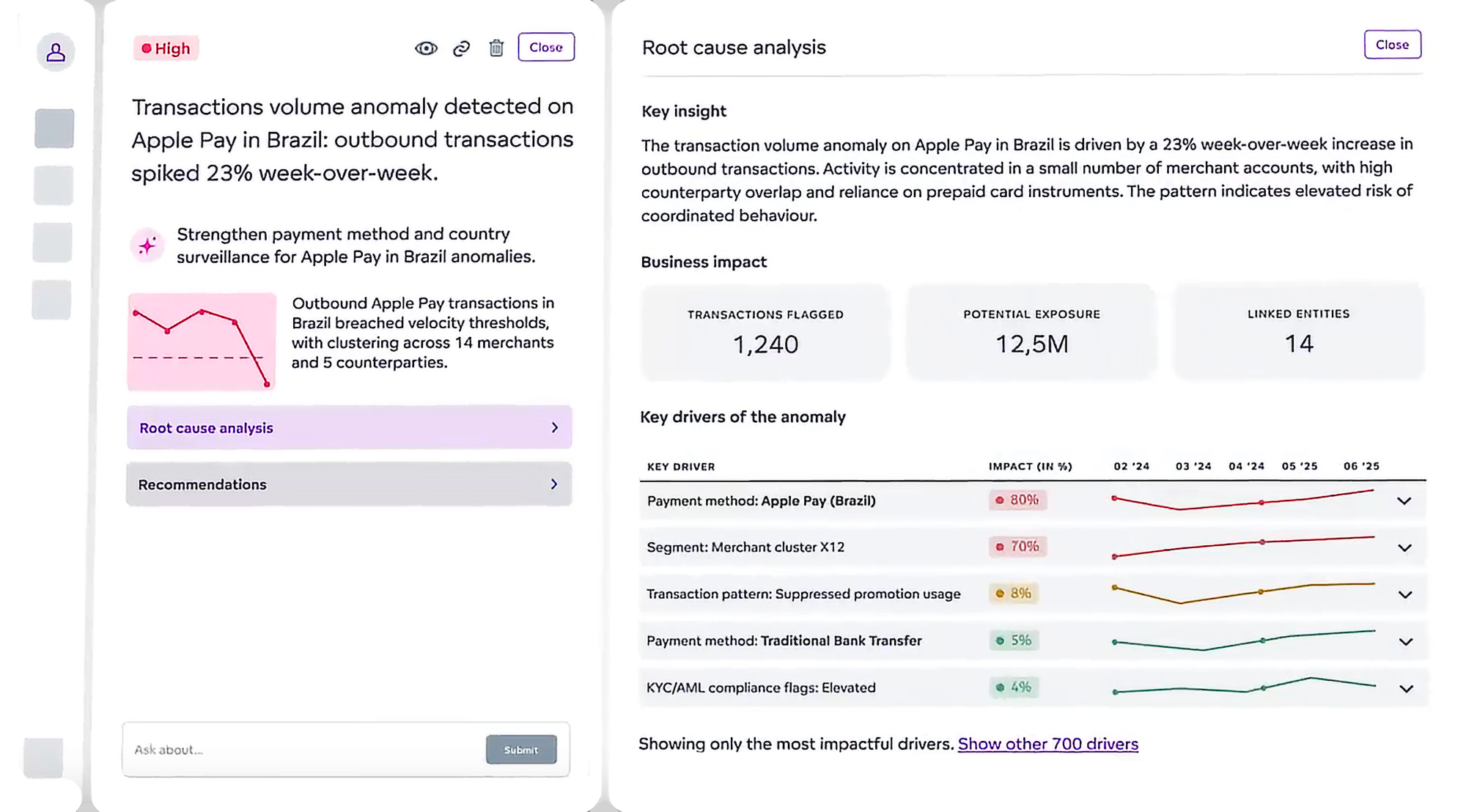
Example of an anomaly and root cause investigation agent
How to Build an AI Agentic Workflow in Six Simple Steps
To build an AI agentic workflow you need to define the outcome, map existing tasks, identify where agents add value, choose a supporting platform, build the workflow, and then test and refine the workflow over time.
Step 1: Define the Outcome and Success Criteria
Define the outcome and success criteria by stating exactly what the workflow should achieve and how success will be measured. Clear goals help the agent understand the objective and guide every decision.
Step 2: Map the Tasks in the Existing Human Workflow
Map the tasks in the existing workflow to understand how work is currently done. This is similar to writing out every step a person takes to complete the task. It helps identify which steps are repetitive, which require judgment, and where the workflow slows down.
Step 3: Decide Where Agents Add the Most Value
Decide where agents add the most value by reviewing the mapped tasks and identifying steps that benefit from reasoning, data access, or automation. Agents are most useful for activities that involve research, analysis, summarization, or multi-step coordination.
Step 4: Choose an AI Agent Platform That Supports Your Needs
You need a data intelligence platform that can create both the agents and the workflows they run. It should supply clean, connected data so agents have the context they need to make accurate decisions.
The platform will make it easy to understand how agents think, integrate with your existing systems, and grow into more complex flows over time. It should also provide guardrails (such as governance and monitoring) and the scale required for real production use.
Step 5: Build the Workflow
Build the workflow using an AI agent workflow builder or software that supports AI orchestration, allowing teams to design steps without deep technical expertise. Your data intelligence platform will connect agents, tools, and decision points, making it clear how information and context flow through the workflow.
Step 6: Test, Monitor, and Optimize
Test, monitor, and optimize the workflow to ensure reliability and support ongoing workflow optimization. Review accuracy, speed, and edge cases, then adjust prompts, tools, or memory settings. Continuous monitoring helps keep the agent aligned with business goals as processes evolve.
How to Evaluate the Success of Agentic Workflows
Evaluating the success of agentic workflows requires tracking metrics such as accuracy, reliability, task completion, autonomy, cost per run, and overall ROI impact. These measures show how well the workflow performs and where adjustments may be needed.
Accuracy and Reliability
Accuracy and reliability measure how often the agent produces correct and trusted outputs. This ensures the workflow performs consistently in real business conditions.
Task Completion Rate
Task completion rate shows how often the workflow reaches the intended outcome without manual intervention. Higher completion rates indicate stronger performance and better workflow stability.
Latency and Throughput
Latency and throughput measure how quickly the workflow runs and how many tasks it can handle at once. These metrics help teams understand whether the agent can scale with demand.
Autonomy Score and Human Escalation Rate
Autonomy score and human escalation rate reveal how independently the agent can operate. A lower need for human input indicates stronger reasoning, better memory use, and more reliable decision-making.
Cost Per Workflow Run
Cost per workflow run calculates the operational expense of each execution. This helps teams compare agentic workflows to traditional manual effort or legacy automation.
ROI Impact Across Teams
ROI impact across teams shows the broader value the workflow delivers. This can include time saved, faster insights, fewer errors, improved customer experiences, or increased revenue contribution.
Agentic AI Workflow Security and Governance Considerations
Agentic AI workflows require robust security and governance measures, including data privacy and access control, guardrails for responsible agent actions, and effective monitoring, logging, and explainability.
Data Privacy and Access Control
Data privacy and access control ensure that agents only access information for which they are authorized. This protects sensitive data across every step of the workflow.
Teams set rules that define what data the agent can view, update, or share. Access controls restrict the agent’s permissions in the same way that permissions limit what a human employee can do in a system. Encryption, redaction, and governed data layers provide additional protection, ensuring information remains secure even when agents transition between tools or apps.
Guardrails and Responsible Agent Actions
Guardrails and responsible agent actions prevent agents from taking steps that fall outside business policies or ethical boundaries. These guardrails serve as safety rails, keeping the agent on the intended path.
Common guardrails include:
- Action limits — so agents cannot perform restricted tasks.
- Human approval steps for sensitive decisions.
- Clear definitions of what the agent should and should not do.
Monitoring, Logging, and Explainability
Monitoring, logging, and explainability provide visibility into how agents make decisions and what actions they take. This creates transparent and observable workflows where every step can be traced.
Monitoring helps teams see how the workflow performs in real time. Logging records each action, allowing teams to audit what happened and why. Explainability provides insight into the reasoning behind agent decisions, which is essential for building trust, ensuring compliance, and facilitating intelligent data management.
Challenges and Limitations of AI Agent Workflows
AI agent workflows offer significant value but also present challenges that organizations must manage. These challenges appear in areas such as control, integration, data quality, and coordination. Understanding these limitations helps teams build safer agents and more reliable agentic systems.
Over-Automation
The risk of over-automation arises when agents operate without sufficient oversight, resulting in unexpected or unintended behavior. Without guardrails, an agent may interpret instructions too broadly or continue a task that should have required a human in the loop.
Teams can mitigate this risk by implementing approval steps, defining clear limits, and closely monitoring the agent’s actions. Responsible automation ensures the agent supports the workflow without replacing critical judgment and decision-making.
Integration Complexity Across Systems
Integration complexity arises from connecting agents to multiple systems, particularly when those systems have unique APIs, stringent identity controls, or legacy infrastructure. Agents need consistent access to data, which can be difficult when information sits in silos.
Organizations can address this challenge by standardizing integrations, improving identity management, and using a data intelligence platform that simplifies how agents connect to tools and data sources.
Data Quality Issues Affecting Agent Decisions
Data quality issues affect agent decisions because agents rely on the information they receive. If the data is incomplete, outdated, or inconsistent, the agent’s outputs will reflect those problems. The rule still holds: garbage in, garbage out.
Improving data governance, adding validation steps, and using clean data sources enable agents to make accurate, reliable decisions across workflows.
One “Mega-Agent” Handling All Use Cases
A common pitfall is trying to solve every use case with one highly complex, general-purpose agent. While appealing, this often increases unpredictability, expands the permission and tool surface, and makes testing and troubleshooting harder. Changes made for one scenario can also accidentally degrade performance in others.
In many cases, workflows are more reliable with multiple, use-case-specific agents. Specialized agents are easier to tune and govern, and failures stay contained to one part of the workflow rather than disrupting everything.
Managing Multi-Agent Orchestration
Managing multi-agent orchestration becomes challenging as the number of agents grows. Multiple agents must agree on task order, hand off work correctly, and avoid conflicting actions. Without coordination, the workflow can slow down or produce inconsistent results.
Successful orchestration requires clear roles, monitoring tools, and processes that resolve conflicts quickly. This will help you to scale agentic automation without losing control or clarity.
GoodData and Agentic Workflows
GoodData provides a full-stack data intelligence platform that supports agentic workflows with the tools, data access, and governance that agents need to act reliably and at scale.
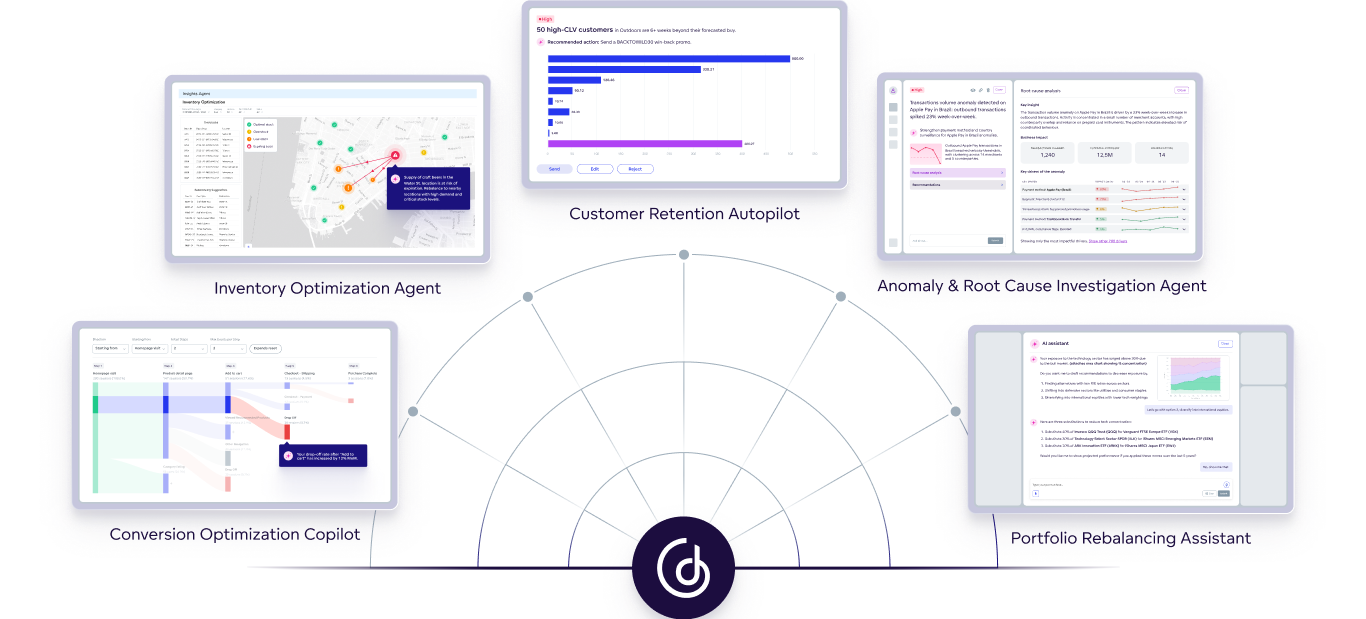
GoodData offers an AI-powered analytics solution that supports agents, copilots, and more
Key Platform Strengths
- AI-native design: GoodData is optimized for high-volume data and agentic workflows, enabling agents to reason, act, and scale across enterprise tasks.
- Composability and transparency: The platform avoids black-box systems. Teams gain clear, modular control over how agents and workflows are built and managed.
- Embed-ready and scalable: You can embed agent workflows into existing business applications and deploy at enterprise scale thanks to built-in multitenancy and scalable architecture.
- Governed intelligence: GoodData combines semantic layers (ontologies and metrics), automation and orchestration tools, and governance frameworks so every agent decision is traceable and compliant.
Get a demo to see how GoodData can power your agentic workflow strategy today.
Agentic Workflows Frequently Asked Questions
Most agentic workflows can be implemented in a few days to a few weeks, depending on complexity. Simple research or summarization workflows launch quickly, while multi-system, multi-agent workflows require more planning, integrations, and testing before going live.
Common mistakes include choosing unclear goals, automating the wrong tasks, relying on black box agents, and skipping data quality checks. Many teams also over-automate early, rather than starting with focused workflows that demonstrate measurable value.
Organizations are ready when they have clear processes, accessible data, and defined outcomes. They may not be ready if data is inconsistent, workflows are undocumented, or teams lack governance for automation. Readiness improves as processes become more structured and measurable.
A common myth is that agentic workflows replace humans. In reality, they augment teams by handling repetitive work and surfacing insights. Another myth is that they require heavy engineering. Modern solutions allow non-technical teams to build reliable agent workflows.
AI copilots help users complete tasks one step at a time, while agentic workflows run entire processes independently. Copilots support individuals. Agentic workflows automate end-to-end operations, coordinate actions across systems, and make context-aware decisions without constant prompting.
Small teams benefit significantly because agentic workflows reduce manual work and unlock scale without hiring large teams. Enterprises gain consistency and governance, but startups often see faster immediate impact thanks to reduced operational overhead.
Look for platforms that provide transparent agent behavior, strong data governance, clear integrations, and support for memory, retrieval, and orchestration. Tools should be composable, secure, and able to scale as your workflows grow in complexity and volume.
The best AI agent for building workflows should offer an intuitive visual editor, letting you map out steps without coding, while also connecting easily to a wide range of tools and data sources. It should support flexible logic, branching, and customization so you can automate both simple tasks and more complex, dynamic processes.