The Problem with "Just Change the Prompt"
5 min read | Published

You're embedding the GoodData AI assistant into your product, and you realize different audiences need different experiences. Your internal team wants a capable, technical assistant with access to every skill and all your organizational knowledge. Your external customers need something simpler and safer, with fewer skills available and no access to internal documents.
Simple request, right? Change the prompt, flip a feature flag, redeploy.
Except now you have several variants to maintain. Each one needs its own skill set, personality, and slice of your knowledge base. Multiply that across user segments and every AI customization turns into a code change, a PR, and a deploy cycle. The AI assistant configuration lives in code, managed by engineers, and it's blocked by release trains.
What if you could manage all of that from a UI and push changes live without touching a single line of code?
That's what the AI Hub is for.
What is the AI Hub?
The AI Hub is a new, dedicated section in GoodData that serves as the central home for all AI capabilities. Instead of scattering AI configuration across workspace settings, feature flags, and codebase constants, the Hub gives administrators a single place to manage how the AI assistant behaves, what it can do, and who gets which experience.
The first capability currently available is the Agent Builder: named agent configurations, each powering a distinct version of the GoodData AI assistant for a specific audience. The Agent Builder acts as a control plane for your AI assistants. You define what each agent can do, how it talks, what knowledge it draws on, and which users receive it. Everything is managed at the organization level, and no redeploy is needed on your side when things change.
From the AI Hub > Agents list, you can see every agent in one place: the always-on Default Assistant alongside any named agents you've created, each showing its state, skill set, user groups, and last-modified timestamp.
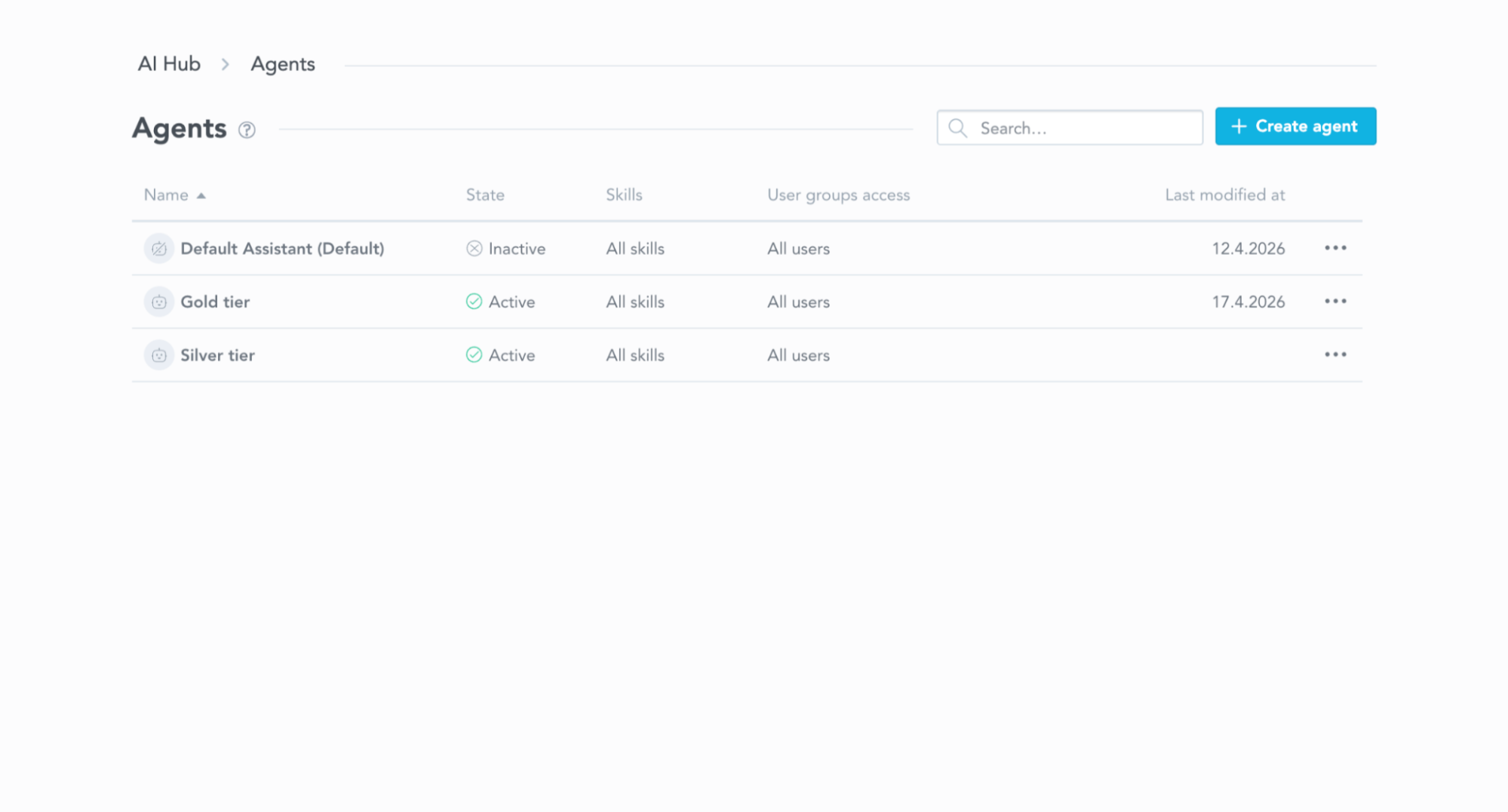
Every agent lives in one list, with state, skills, user groups, and last-modified visible at a glance.
What Makes an Agent
An agent configuration is built from four building blocks. Each is independently configurable, and together they define the complete assistant experience a user receives.
Personality
A free-text instruction that shapes how the assistant communicates. You can set a formal, concise tone for your finance team, or a friendlier, more exploratory style for self-service users. The personality is injected into the assistant's system prompt and changes the tone, style, and focus of every response. The personality layers on top of the base behavior rather than replacing it. The assistant keeps all its core capabilities while adopting the communication style you define.
Skills
Skills are the actions the assistant can perform: trend analysis, anomaly explanation, contextual help, narrative summaries, and more. Each agent configuration has a skill allowlist: either all available skills are enabled, or you hand-pick exactly which ones this agent can use.
This controls how capable each agent feels to the end user. You might set up a basic agent that can only explain what's on the dashboard, and another that analyzes trends, flags anomalies, and writes narrative summaries.
The allowlist is enforced at two layers. Disabled skills are filtered out of the tool registry before the assistant is constructed, and the system prompt only advertises the skills that passed the filter. The LLM never sees a restricted skill as an option, so the restriction is real rather than suggested.
AI Knowledge
Controls whether the agent can access your organization's document library, the files you've uploaded to AI Knowledge for semantic retrieval. With this enabled, the agent can reference your organizational knowledge when answering questions. With it disabled, the agent only uses the data model and its built-in capabilities.
Access
Determines which users receive this agent. You assign user groups, the same groups you already use for permissions across GoodData. When a user opens the AI assistant, the system resolves which agent they should get based on their group membership. The user doesn't pick an agent or even know one was selected; they just see the AI assistant working the way you configured it for their group.
Zero-Deploy Customization
The Agent Builder opens as a split-panel view: configuration form on the left, a live chat preview on the right. You fill in the name, write a personality, select skills, toggle AI Knowledge, and assign user groups. The preview isn't a mockup. It connects to a real workspace and runs the real agent configuration, so you can validate personality, skill behavior, and AI Knowledge responses before any user sees it. Test sessions are tagged separately in observability so they don't pollute production metrics.
When you click Create (or Save on an existing agent), the change is live immediately. There's no staging environment and no deploy queue. New conversations pick up the updated configuration on the next session. If a user tries to resume a conversation that was started under the old configuration, they see a message explaining that the agent has changed and inviting them to start a new chat. There's no silent drift, and no half-updated sessions.
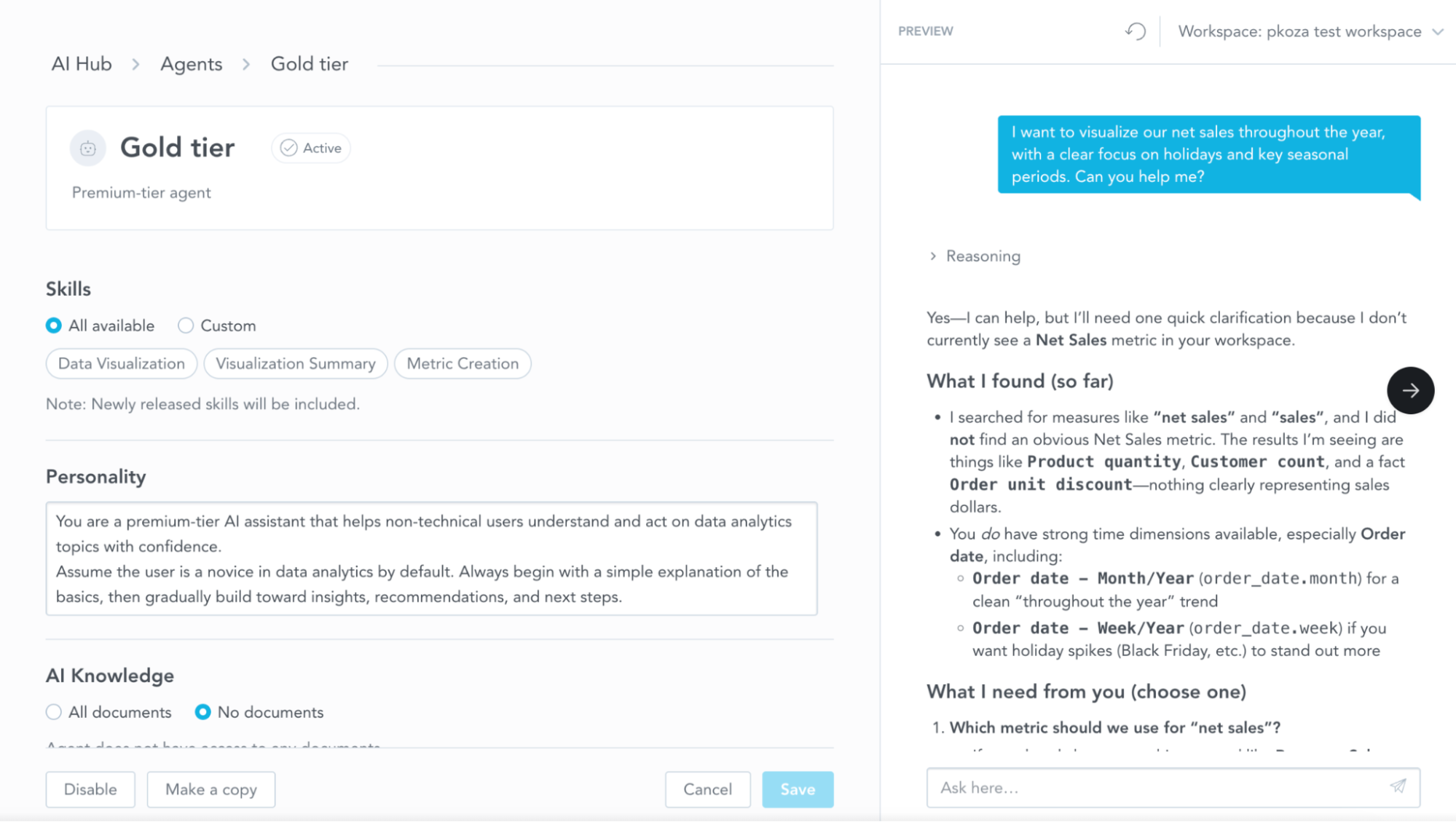
The Agent Builder's split-panel view. The preview on the right is a real conversation against a test workspace, not a mockup.
Every organization also has a Default Assistant that mirrors the out-of-the-box experience. It's always present, can't be deleted, and serves as the fallback for any user who isn't covered by a more specific agent. You can customize on top of it without ever leaving anyone without an assistant.
Putting It Together
Here's a common embedding scenario. Your internal analysts share a GoodData org with your external customers, and each side should get a different AI experience. You create two agents in the AI Hub. The first has every skill enabled and full AI Knowledge access, and it's assigned to the analysts-internal group. The second has a narrower skill set and no document access, and it's assigned to the customers-external group. The Default Assistant stays as the fallback for anyone outside those groups.
From a developer's perspective, the upside is what you don't have to build. You don't have to branch on user type in your frontend, wrap a feature flag around the embedded component, or ship separate "analyst" and "customer" builds. The GenAIAssistant component is identical in both cases, and the user's group membership decides which agent loads, resolved server-side when the conversation starts.
Embed Once and Reuse
If you're embedding the GoodData AI assistant using @gooddata/sdk-ui-gen-ai, here's what that integration looks like in code:
import { GenAIAssistant } from "@gooddata/sdk-ui-gen-ai";
import "@gooddata/sdk-ui-gen-ai/styles/css/main.css";


const App = () => (
    <div style={{ width: 500, height: 600, display: "flex" }}>
        <GenAIAssistant
            workspace="my-workspace-id"
            backend={analyticalBackend}
        />
    </div>
);
That's the whole integration. There's no agent prop or configuration to pass through. The workspace prop is required because the assistant always runs in workspace context, but the agent selection is handled entirely on the backend.
For non-React contexts, the same functionality is available as a web component:
<gd-ai-assistant workspace="my-workspace-id"></gd-ai-assistant>
The result is a stable integration contract. The props and events you bind to don't change when an agent is created, edited, or reassigned, since the agent is resolved per conversation on the server. The only observable shift on the client is that new conversations may carry a different persona, skill set, or knowledge footprint, and you don't have to change anything in your code for that to happen.
Beyond Agent Builder: The AI Hub Roadmap
The Agent Builder is the first capability in the AI Hub, but the Hub is designed to grow. The goal is to have a single surface for everything that controls how AI works in your GoodData environment.
More is on the way. Expect the Hub to evolve into a richer control plane, with agents becoming more capable and reaching beyond the embedded chat experience, and the management side getting deeper as deployments scale. We'll share the specifics as they ship.
Agent Builder is the first step, and it's available today.
Over time, the AI Hub should become the single place to understand, configure, and govern everything AI does in your analytics platform. Agent Builder is the first step, and it's available today.