AI Hub
Experimental Feature
This is an experimental feature that is still under active development. Its behavior may change in future releases, or the feature may be removed.
AI Hub lets organization administrators create and manage different AI Assistant configurations in one place. Each configuration controls how the assistant behaves, which skills it can use, whether it can access AI Knowledge, and which user groups receive that experience. A Default Assistant is always available, and any changes to agent configurations take effect immediately.
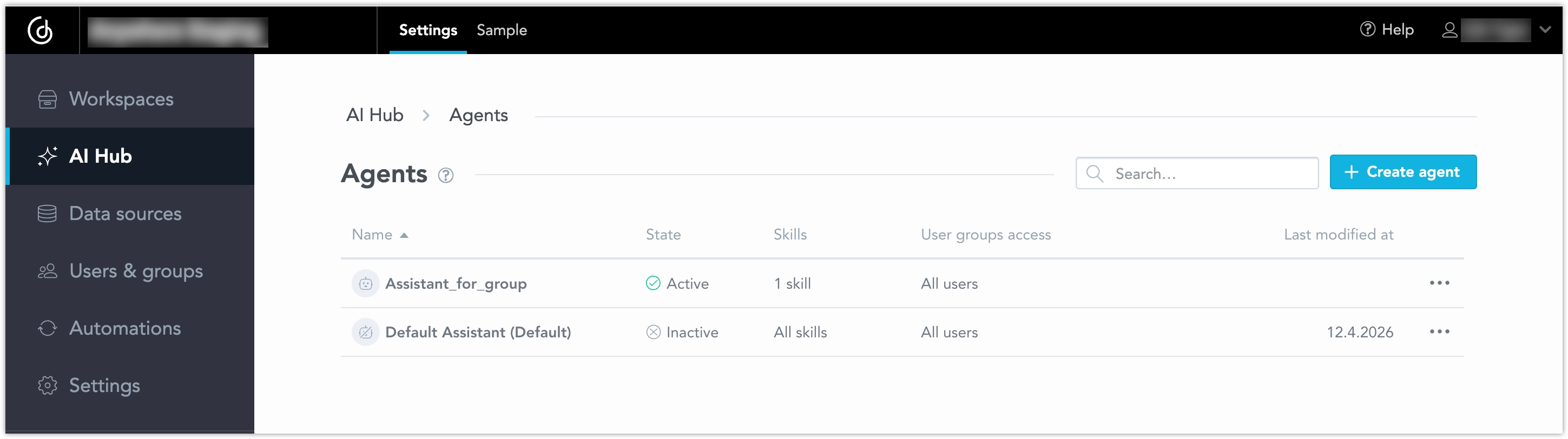
Configure AI Assistant Experiences in AI Hub
In AI Hub, you can create named agent configurations for the AI Assistant. Each agent configuration defines a specific assistant experience for a set of users.
An agent configuration includes these settings:
- Personality: a custom instruction that shapes how the assistant communicates
- Skills: the set of platform skills the assistant is allowed to use
- AI Knowledge: whether the assistant can access AI Knowledge
- Access: which user groups receive that assistant experience
This lets you create different assistant experiences for different groups of users without changing code or redeploying your solution. For example, you can create separate assistants for basic, advanced, or specialized use cases.
Create an Agent Configuration
To create an agent configuration:
Open AI Hub at the organization level.
Go to the list of available agents.
Click Create agent.
Enter a name and, optionally, a description.
Configure the assistant:
- choose which skills are enabled
- add a personality instruction
- turn AI Knowledge access on or off
- assign the agent to one or more user groups, or enable it for all users
Save the configuration.
The new agent becomes active immediately after you create it.
Personality
Personality is a free-text instruction that influences how the assistant communicates. You can use it to adjust tone, style, or response behavior for a specific audience. For example, you might configure one assistant to provide short business-friendly summaries and another to provide more detailed analytical explanations.
Skills
You can control which platform skills an assistant is allowed to use. There are two modes:
- All enabled: the assistant can use all available platform skills
- Custom: the assistant can use only the skills you select
This helps you tailor the assistant to different user groups or use cases. For example, one assistant can have a limited skill set for general business users, while another can expose a broader set of capabilities for advanced users.
AI Knowledge
You can turn AI Knowledge access on or off for each agent configuration. When AI Knowledge is enabled, the assistant can use the document retrieval layer. When it is disabled, the assistant does not use that content source.
Access by User Group
Agent configurations are assigned through user groups or by enabling access for all users. This allows administrators to manage assistant experiences at scale. For example, you can assign one assistant to an internal analyst group and another to a broader business user group. Individual user assignment is not supported in this scope.
Manage Existing Agents
AI Hub also lets you manage existing agent configurations. You can view existing agents, edit an agent, duplicate an agent, enable or disable an agent, and delete an agent. Changes take effect immediately after you save them.
Edit an Agent
When you edit an agent, you can update its name, description, personality, skills, AI Knowledge setting, or assigned user groups.
Duplicate an Agent
Duplicating an agent creates a new configuration based on an existing one. This is useful when you want to create a similar assistant experience and adjust only a few settings. For example, you can duplicate a general-purpose assistant and then create a more specialized version for a specific user group. The duplicate is set to enabled by default.
Enable, Disable, or Delete an Agent
You can enable or disable agents to control which configurations are available to users, and you can delete configurations that you no longer need. A disabled agent is not available to assigned users until it is enabled again. Deleting an agent removes that configuration entirely.
Default Assistant
A Default Assistant is always available in any organization, providing the standard AI Assistant experience and acting as the fallback setup. This guarantees a basic assistant configuration is accessible at all times, though it can be removed if unnecessary.
How Agent Resolution Works
Users always see the AI Assistant. They do not see which agent configuration is active. If multiple agent configurations match the same user, the most recently modified one is used. This lets administrators update assistant experiences centrally without requiring any action from end users.
Example
A common use case is to provide different assistant experiences for different user groups. For example:
- a general business group receives an assistant with a limited set of skills
- an analyst group receives an assistant with a broader skill set
- a documentation-focused group receives an assistant with AI Knowledge enabled
All of these configurations can be managed from AI Hub.