AI Knowledge
AI Knowledge lets you manage knowledge files through the UI or API and then leverage them in the AI Assistant. By ingesting internal company documents and product resources, GoodData transforms them into searchable knowledge that can be used in natural language interactions.
AI Knowledge is an experimental feature that is still under active development. Its behavior may change in future releases.
What AI Knowledge Does
AI Knowledge helps you ingest documents into a knowledge store, run semantic search over the ingested content, and use the retrieved snippets as input for the AI Assistant.
It currently works with plain-text content provided as:
- Markdown files
- Text files
If your source content is stored in another format, extract the text first and convert it to one of the supported formats before ingestion.
How It Works
When users ask questions that relate to organizational knowledge, the AI Assistant searches ingested documents and uses matching content to ground its answers.
What users can expect:
- Workspace-level documents are prioritized when searching from a workspace.
- Answers include citations such as the document title or filename, and page numbers when available.
- The assistant only cites documents it actually used.
Permissions
Required permissions:
- Create, upsert, patch, delete:
WRITE_KNOWLEDGE_DOCUMENTS - Search, list, get:
READ_KNOWLEDGE_DOCUMENTS
These permissions follow the standard workspace permission hierarchy. For example, MANAGE implies write, which implies read.
Ingestion
When you ingest a document, GoodData splits the content into chunks, creates embeddings for those chunks, and stores them for retrieval.
Default settings:
- Chunk size: 1000 characters
- Chunk overlap: 200 characters
- Split priority:
##headers,###headers,####headers, paragraphs, lines, sentences, words, characters
If you provide pageBoundaries in the request, chunks track which page numbers they span.
Document Scope and Visibility
Documents can be scoped to a workspace. When searching from a workspace, workspace-level documents are prioritized.
Working with Documents
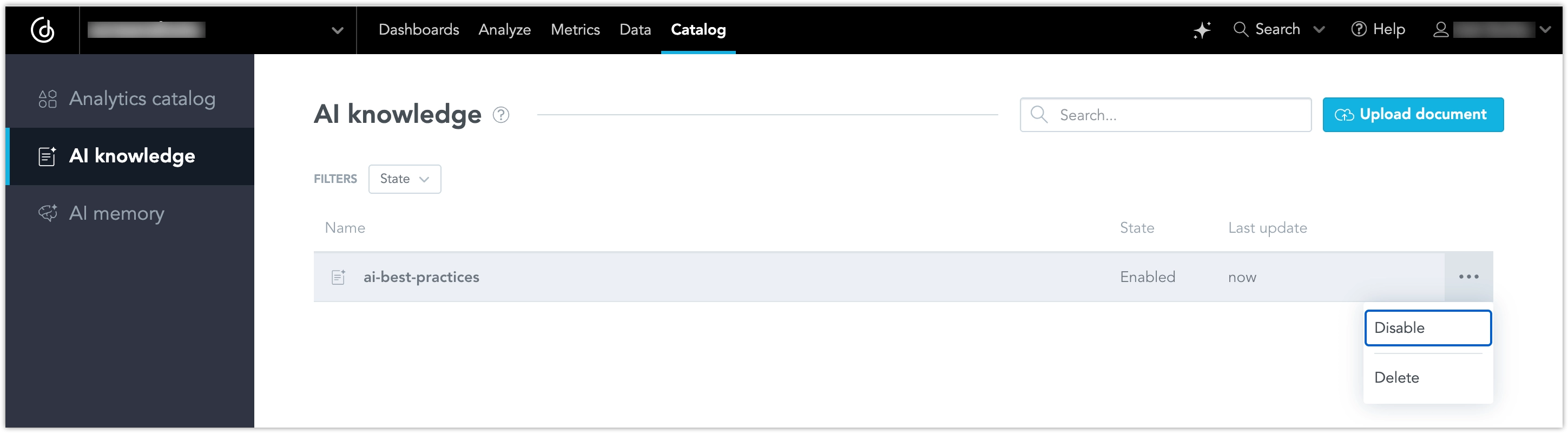
Use the AI knowledge tab in the Analytics catalog to upload and manage knowledge files.
Upload a Document
- Go to Catalog and select AI knowledge.
- Click Upload document.
- Select a supported file and complete the upload.
After the upload finishes, the file appears in the list.
Search and Filter Documents
Use the search field to find documents by name. Use the State filter to narrow the list by document state.
Manage Existing Documents
To manage a document, open the … (ellipsis) menu next to the document.
Available actions include:
- Disable to exclude the document from AI Knowledge search without deleting it
- Delete to remove the document from AI Knowledge
A disabled document remains in the list but is not returned in search results.
Base path: /api/v1/actions/workspaces/{workspaceId}/ai/knowledge
Create a Document
POST /documents creates a new document.
Request fields include:
filename(required)content(required): full document textpageBoundaries(optional): character offsets for page breakstitle(optional)
The response includes numChunks.
Upsert a Document
PUT /documents creates the document if it does not exist, or updates it if it does. On update, mutable fields such as title, scopes, and content are updated and old chunks are deleted.
List Documents
GET /documents lists documents visible in the workspace. It supports cursor-based pagination.
Get, Patch, Delete
GET /documents/{filename}returns document metadata.PATCH /documents/{filename}updates metadata without re-ingesting content.DELETE /documents/{filename}deletes the document and its chunks.
Search
GET /search runs semantic similarity search over document chunks. It returns results from the current workspace and excludes disabled documents.
The API supports:
query(required)limit(default 10)minScore(default 0.0)scopes(optional OR-based filtering)
Topic tag filtering using scopes is available via the REST API, but it is not currently used by the assistant tools.
Persistent Document Storage
AI Knowledge uses persistent storage for document metadata and raw document content.
This improves reliability because the retrieval index is not the only place where documents exist. If the index must be rebuilt, the system can restore documents from persistent storage and index them again.
This means the system can:
- Recover documents from the persistent store
- Rechunk and re-index documents without requiring users to upload them again
- Rebuild the retrieval index after index loss or other maintenance events
Common Use Cases
- Search internal documentation and policies from the AI Assistant.
- Help users find the right metric, dashboard, or workflow by searching product documentation.
- Ground answers in organization processes, playbooks, and other internal knowledge.
Current Limitations
The following limitations apply in the current version:
- Content size limit is about 256 KB per ingestion request.
- Scope filtering is OR-only when multiple scopes are provided.
- Search is not paginated. It returns the top results up to the requested
limit. Document listing is paginated. - Only Markdown and text files are currently supported for ingestion. Support for additional file types may be added in a future release.
- Topic tag filtering is available through the REST API, but it is not currently used by the assistant tools.
- Organizations that opt out of data sharing cannot use AI Knowledge (
data_share_opt_out=false).